AI Chatbot ROI Calculator: Measure Your Return in Real-Time
This blog presents a practical framework for measuring the ROI of AI chatbots (using Agentia as an example). It explains why financial clarity matters, defines key terms (deflection, containment, cost per ticket, conversion value), and identifies the main ROI levers—volume reduction, faster resolution, extended coverage, revenue/retention uplift, and agent efficiency. It warns against common mistakes, offers a simple ROI formula and a step‑by‑step spreadsheet calculator with an example, and covers pilots, metrics to track, advanced modeling (quality weighting, churn, maintenance), and optimization tips. The purpose is to help teams decide, justify, and scale chatbot automation with realistic, data‑driven estimates confidently.
If you've been thinking about adding an AI chatbot like Agentia to your support stack, you're not alone. I've spoken with dozens of founders, product managers, and support leaders who all want the same thing: reliable numbers that prove real value. Vague promises and pilot reports only go so far. What your team needs is a practical way to calculate AI chatbot ROI with Agentia, so you can decide, justify, and optimise with confidence.
In this post I’ll walk you through a simple, practical framework for measuring chatbot return on investment. I’ll share the metrics that matter, common mistakes I see, a step-by-step calculator you can use, and tips for turning early wins into sustained cost savings and better customer experience. No buzzword soup. Just the facts and tools you can apply today.
Why measuring AI chatbot ROI matters
Everyone likes the idea of automation. But in B2B SaaS, leaders need financial clarity. You want to know if a chatbot reduces support costs, shortens response times, or improves retention. In my experience, teams that quantify results win buy-in faster and scale automation more effectively.
Here are the top reasons to measure AI chatbot ROI now:
- It provides budget-level justification for automation projects.
- It highlights which workflows drive the most cost savings.
- It helps prioritize improvements using data, not opinions.
- It shows how automation impacts KPIs like NPS, resolution time, and churn.
Put simply, if you can measure it, you can manage it. If you can manage it, you can improve it.
Core concepts and terms (quick primer)
Before we jump into calculations, let’s align on a few terms. I use them often with customers and they crop up in any meaningful ROI discussion.
- Deflection — A conversation handled by the chatbot that would otherwise go to a human agent.
- Containment — A chatbot fully resolving a user’s request without escalation.
- Handle Time — The time a human agent spends resolving a ticket.
- Cost per Ticket — Average cost to handle one ticket (salary, benefits, tools, overhead divided by tickets handled).
- Conversion Value — Revenue impact from upsell, cross-sell, trial-to-paid conversion, or churn reduction influenced by the chatbot.
- Time to Value — How long until the chatbot begins producing net savings.
These terms will map directly into the calculator and help you tell a clear story about ROI.
What actually drives chatbot ROI
People often assume the only benefit is reduced headcount. That’s one part, but it’s not the whole picture. In practice, ROI is driven by a few levers you can affect:
- Volume reduction — fewer tickets routed to humans because the chatbot handles them.
- Faster resolution — when the chatbot reduces average handling time, even for tickets that get escalated.
- Extended coverage — 24/7 self-service reduces peak staffing needs.
- Increased retention and revenue — reduced churn and improved conversions thanks to faster answers.
- Quality and efficiency gains — agents focus on higher-value work, improving productivity and morale.
Most teams see a mix of these effects. The numbers you’ll model depend on which levers you target first.
Common mistakes to avoid
Before you build a model, let me warn you about things I see that skew results or slow your program down.
- Counting every chatbot interaction as a “saved ticket.” Not every chat that starts with the bot would have become a human ticket. You need a realistic baseline.
- Ignoring escalation costs. If a bot reduces volume but increases the average complexity of escalated tickets, your savings shrink.
- Using gross salary instead of fully loaded cost per agent. Overheads matter. Include tools, office costs, benefits, and management time.
- Forgetting implementation and maintenance costs. Training, integrations, prompt tuning, and monitoring are ongoing expenses.
- Assuming instant perfect accuracy. Expect a ramp period where containment and deflection improve gradually.
If you plan for these pitfalls up front, your ROI model will be much closer to reality.
The simple ROI formula
There are many ways to calculate ROI. I prefer starting with this plain formula because it’s easy to explain and to adapt to your context:
ROI = (Total Benefits - Total Costs) / Total Costs
In this case:
- Total Benefits include chatbot-driven cost savings plus any added revenue from reduced churn or higher conversions.
- Total Costs cover the chatbot platform, implementation, ongoing tuning, and any increased escalation costs.
Let’s break those numbers down so you can plug real inputs into a calculator.
Customer Service Automation Tools: Boost Support Efficiency with AI
Explore the top customer service automation tools that help businesses streamline support, reduce response times, and improve customer experience. This guide covers AI-powered chatbots, workflow automation, and ticketing systems that handle repetitive tasks, boost agent productivity, and scale operations efficiently. Learn how the right tools can transform your support strategy and deliver faster, more consistent service.
Step-by-step: Building your AI chatbot ROI calculator
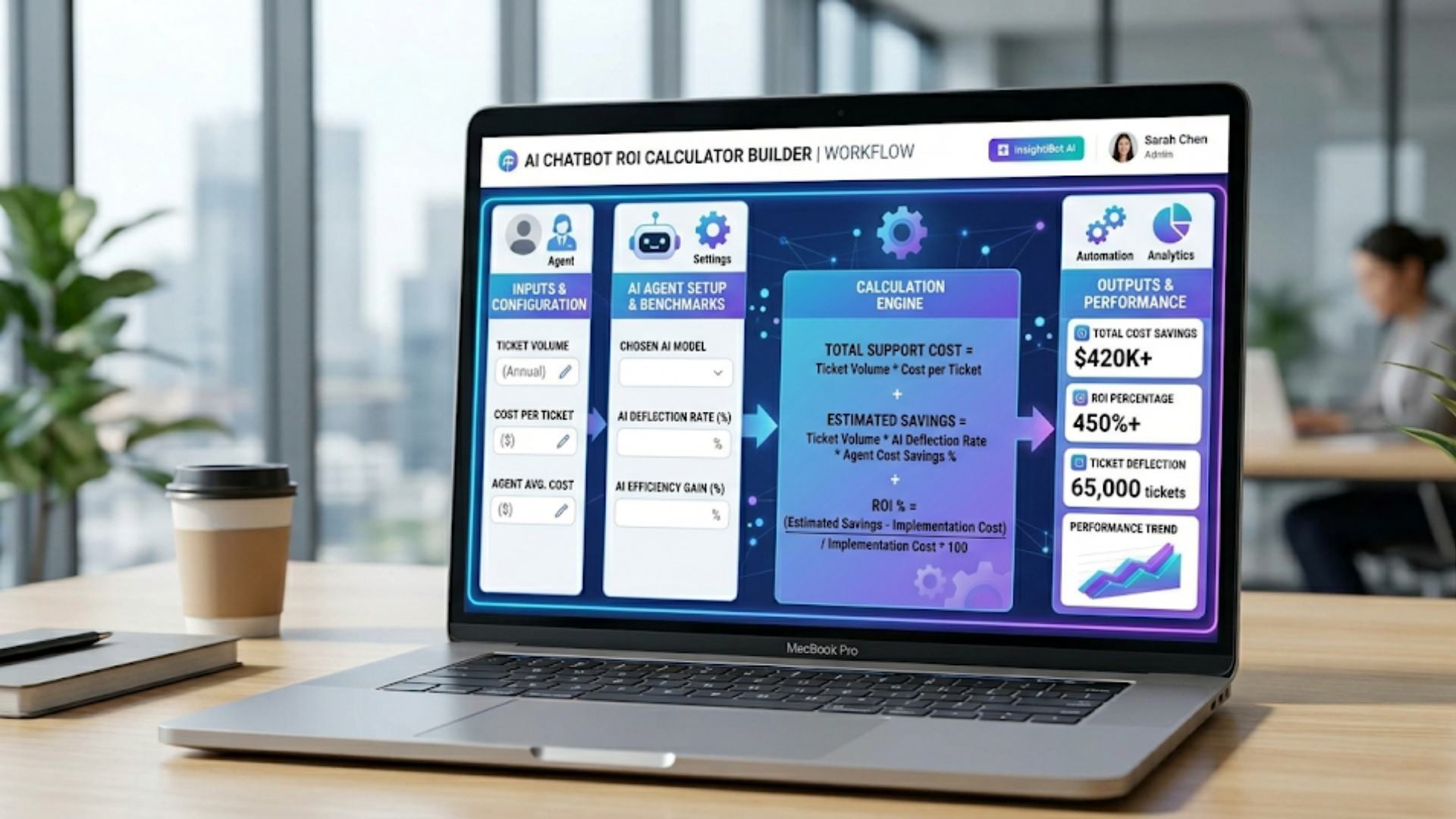
Below is a practical framework you can recreate in a spreadsheet. I’ll walk through each input, explain where to get data, and show how to turn that into a forecast.
Inputs you need
Start by collecting these baseline numbers. These are the data points I ask for in the first 30 minutes of a scoping call.
- Monthly ticket volume
- Current average handle time per ticket (minutes)
- Current first response time and resolution time
- Number of agents and fully loaded cost per agent per month
- Average tickets per agent per month
- Current containment rate (if any automation exists)
- Expected containment rate for the chatbot (initial and target)
- Expected deflection rate
- Implementation cost (one time)
- Monthly subscription and maintenance cost
- Estimated revenue impact from improved retention or conversions
Don't have every number? Use reasonable estimates and sensitivity ranges. Shaky inputs are better than no inputs. We refine as data comes in.
Calculations
Use these calculations to translate inputs into dollar savings.
- Baseline cost per ticket
Fully loaded cost per agent per month divided by tickets per agent per month.
- Monthly cost savings from deflection
Tickets deflected by chatbot times cost per ticket.
- Monthly cost savings from reduced handle time
Tickets still handled by humans multiplied by handle time reduction multiplied by cost per minute.
- Revenue impact
Estimated monthly increase from retention or conversions attributable to the chatbot.
- Total monthly benefit
Sum of cost savings and revenue impact.
- Total monthly cost
Monthly subscription, maintenance, and allocated implementation amortized over an expected lifetime.
- ROI
Use the ROI formula above on monthly or annual numbers.
Here is a very simple example to make it concrete.
Simple example
Imagine a mid-market SaaS company with these inputs:
- Monthly tickets: 5,000
- Agents: 10; fully loaded cost per agent per month: 8,000
- Tickets per agent per month: 500
- Baseline containment: 0% (no automation)
- Expected initial containment: 20% of incoming chats
- Expected handle time reduction for escalated tickets: 15%
- Implementation cost: 30,000
- Monthly subscription and maintenance: 4,000
- Estimated monthly revenue impact: 2,000
Step calculations:
- Cost per ticket = 8,000 / 500 = 16 per ticket
- Tickets deflected = 5,000 * 20% = 1,000
- Deflection savings = 1,000 * 16 = 16,000 per month
- Escalated tickets = 4,000. Handle-time reduction savings = 4,000 * (average time saved in minutes * cost per minute)
- Assume average time saved is small but meaningful. Add revenue impact of 2,000
- Total benefits might land near 20,000 per month while monthly costs are 4,000 plus amortized implementation (say 2,500)
- Net monthly benefit = 20,000 - 6,500 = 13,500. ROI = 13,500 / 6,500 = 208%
That's a rough example. Your numbers will differ. But you get the idea: deflection plus efficiency gains equals real dollars.
Advanced considerations
Once you have a basic calculator, you can layer in more advanced items to make the model richer and more realistic.
1. Track quality of deflection
Not all deflections are equal. A containment that fully resolves a billing issue is worth more than one that gives a link to self-serve documentation. I always advise teams to segment deflection by intent and dollar impact.
- High-value containment: account changes, subscription updates, cancellations avoided.
- Low-value containment: navigational help, documentation links.
Weighting deflections by value gives you a more accurate estimate of benefits.
2. Include churn and retention modeling
Small changes in churn can have outsized financial effects. If your chatbot reduces frustration during onboarding or handles high-risk cancel flows, model the impact on churn over 6 to 12 months.
For example, reducing monthly churn by 0.2% on a 10 million ARR business is meaningful. Even a small percent change matters.
3. Model fatigue and ongoing maintenance
Chatbots are not set-once-for-all. They require prompt tuning, training data refreshes, and monitoring. Budget time for ongoing improvements. In my experience, teams that allocate at least 10 to 20 percent of their implementation budget to ongoing work avoid losing early gains.
4. Account for channel shift
Sometimes chatbots shift volume from email or phone to chat. That can lower costs because chat is often cheaper, but make sure you account for cross-channel impacts so you don’t overclaim savings.
How to measure performance over time
ROI is not a one-time calculation. Treat it as a living metric you update monthly. I recommend tracking a few core chatbot performance metrics each week, and reviewing ROI monthly.
- Containment rate — percent of conversations fully resolved by the bot
- Deflection rate — percent of incoming requests the bot handles instead of humans
- Escalation rate — percent of conversations passed to human agents
- Average handle time — changes over time for both bot-handled and human-handled tickets
- CSAT and NPS — track customer satisfaction for bot interactions separately
- Conversion and churn metrics — to connect to top-line impact
One useful tip: track “bot-assisted” tickets separately. These are cases where the bot did some initial work, then an agent finished the job. Often those tickets are faster to resolve. That reduction in handle time adds up.
Examples and quick scenarios
Real examples help make numbers real. Here are three simple scenarios you might relate to.
Scenario A: Early-stage SaaS with high volume of onboarding questions
Problem: New users create lots of tickets about activation and setup. Agents are spending hours on repetitive answers.
Approach: Build a focused onboarding flow in the chatbot that walks users through setup and solves 40 percent of onboarding issues.
Result: Immediate reduction in peak volume, faster onboarding time, better trial-to-paid conversion. The ROI is driven by increased conversions and agent time recovered.
Scenario B: Mid-market with seasonal peaks
Problem: Support costs spike during product launches or billing cycles. Hiring temporary staff is expensive and onboarding takes time.
Approach: Deploy a chatbot for peak weeks to cover common billing and launch questions. Use it as first-line during the spike.
Result: Lower peak staffing costs and improved SLAs. Even if the bot’s containment is 25 percent, the savings on temporary hires alone can pay for the chatbot.
Scenario C: Enterprise with complex escalation workflows
Problem: Tickets contain complicated data and require multiple handoffs, causing long resolution times.
Approach: Use the chatbot to collect structured information, pre-validate data, and route tickets to specialized queues with the right context.
Result: Agents spend less time on information gathering. Resolution time drops and customer satisfaction increases. The value here is higher agent productivity and fewer repeat contacts.
How to run a realistic pilot
Pilots are the typical next step. Run them well, and you’ll get the data you need. Run them poorly, and you’ll end up with ambiguous results.
Follow these rules for a clean pilot:
- Choose a narrow, high-value use case (billing, onboarding, password reset). Don’t try to automate everything at once.
- Set clear success metrics before you start: containment rate target, reduction in agent handle time, CSAT target.
- Run the pilot for a statistically meaningful period, usually 4 to 8 weeks depending on volume.
- Compare pilot weeks to historical baselines that control for seasonality.
- Log qualitative feedback from agents and customers. Numbers matter, but context matters too.
In our experience, pilots that follow these rules produce convincing ROI cases that scale.
Tools and analytics you'll want
Not every company needs a full analytics stack, but you should have the following capabilities to measure chatbot ROI properly.
- Conversation analytics: segment interactions by intent, outcome, and funnel drop-offs.
- Attribution: link chatbot interactions to downstream revenue or retention events.
- Agent productivity dashboards: track changes in tickets per agent and average handle time.
- Experiment tracking: version control for prompts or flows, and A/B test results.
Agentia provides built-in analytics that map to these needs. If you have a bespoke stack, make sure your analytics can answer basic questions like "Which intents produce the most savings?" and "How does bot-handled CSAT compare to agent-handled CSAT?"
How to present ROI to stakeholders
When you bring ROI numbers to the leadership table, keep it simple and honest. I recommend this concise structure:
- State the problem in one sentence (e.g., peak billing tickets cost X per month).
- Show the proposed solution and selected use case.
- Give the headline metric: projected net monthly savings or payback period.
- List key assumptions and sensitivity ranges.
- Share next steps and pilot plan with clear success criteria.
Decision makers want a clear answer: how long until this pays for itself and what could go wrong. Provide both the upside and realistic downside scenarios.
How to optimize chatbot ROI after launch
Launching is only the start. Optimization is where you compound value.
- Improve intent coverage. Add the top 20 intents causing most volume first. That gives quick wins.
- Refine handoffs. Make sure escalations include complete context so agents don't have to start over.
- Measure and improve CSAT. If customers prefer human interactions for certain intents, adjust triage rules.
- Run regular prompt tuning to reduce hallucinations and increase containment accuracy.
- Set up a feedback loop between support and product teams. Many product improvements come from common chatbot queries.
In my experience, teams that treat chatbots as a product see faster ROI improvements than teams that treat them as a one-off automation.
How long until you see ROI?
Short answer: it depends. Expect some benefits within the first 30 to 90 days, and clearer ROI within 3 to 9 months.
Why the range? There are a few reasons:
- Ramp time for containment accuracy and intent coverage
- Integration and data quality issues that slow performance
- Time to tune and add content for complex workflows
For targeted use cases like password resets or billing FAQs, you can see payback in under three months. For broader support automation that touches onboarding and churn prevention, give it a bit longer. Build expectations accordingly.
Real pitfalls that kill ROI (and how to avoid them)
I've seen pilots with promising initial metrics fail because teams ignored these issues. Avoid them.
- Poor training data — If your chatbot is trained on outdated or noisy transcripts, it will make mistakes. Clean your data first.
- No business rules — Purely generative bots without routing and guardrails can escalate unnecessarily. Add business rules and validation steps.
- Underfunded maintenance — If you treat the bot as set-and-forget, containment drops and ROI evaporates. Allocate resources for ongoing tuning.
- Unclear escalation paths — Agents get frustrated if they receive partial context. Build structured handoffs and metadata.
- Ignoring customer feedback — If customers say they prefer human contact for certain issues, respect that. Not every conversation should be automated.
Plan for these risks. You’ll get farther, faster.
Quick checklist before you build your first ROI model
- Have a focused use case with high ticket volume or high cost per ticket.
- Collect baseline metrics for a clean comparison period.
- Estimate fully loaded agent costs, not just salary.
- Define success metrics and length of pilot.
- Prepare analytics to attribute revenue and retention impacts if relevant.
Think of this checklist as your pre-flight routine. Skip it and you’re flying blind.
Sample ROI spreadsheet layout
Here’s a simple layout you can drop into a spreadsheet. I keep my own copy for quick scoping calls.
- Inputs section (tickets, agents, costs, containment assumptions)
- Calculation section (cost per ticket, deflection savings, handle time savings)
- Outputs section (monthly benefits, monthly costs, net savings, ROI, payback months)
- Sensitivity table (low, base, high scenarios for containment and revenue impact)
# Example formulas
Cost per ticket = FullyLoadedAgentCostPerMonth / TicketsPerAgentPerMonth
DeflectionSavings = MonthlyTickets * DeflectionRate * CostPerTicket
HandleTimeSavings = (MonthlyTickets * (1 - DeflectionRate)) * AvgMinutesSaved * CostPerMinute
TotalBenefits = DeflectionSavings + HandleTimeSavings + RevenueImpact
MonthlyNet = TotalBenefits - MonthlyCosts
ROI = MonthlyNet / MonthlyCosts
That code block shows the minimal math. Your spreadsheet will flesh out the details and show month-over-month curves.
How Agentia can help
If you want to skip the spreadsheet, we built tools that make this easier. Agentia’s platform is designed to measure chatbot performance and map automation wins to financial outcomes. We focus on the practical parts: analytics that tie into your support stack, guardrails that reduce escalation friction, and dashboards that show ROI in real time.
I’m biased, of course. But in my work with customers across B2B SaaS, the combination of focused use cases and continuous measurement is what turns pilots into company-level savings.
FAQs
1. How do you calculate AI chatbot ROI?
AI chatbot ROI is calculated using the formula: (Total Benefits – Total Costs) / Total Costs. Benefits include cost savings from ticket deflection, reduced handle time, and revenue gains from improved retention or conversions, while costs include implementation, subscription, and maintenance expenses.
2. What metrics are most important for measuring chatbot ROI?
Key metrics include deflection rate, containment rate, average handle time, cost per ticket, customer satisfaction (CSAT), and revenue impact from conversions or reduced churn. These metrics help quantify both cost savings and business value.
3. How long does it take to see ROI from an AI chatbot like Agentia?
Most businesses start seeing initial results within 30 to 90 days, with clearer ROI typically achieved within 3 to 9 months. The timeline depends on use case complexity, data quality, and how quickly the chatbot is optimized.
4. Can AI chatbots really reduce customer support costs?
Yes, AI chatbots can significantly reduce support costs by handling repetitive queries, lowering ticket volume, and improving agent efficiency. When implemented correctly, they also enhance customer experience and contribute to higher retention and revenue.
Measuring AI chatbot ROI is both art and science. The math is straightforward, but the devil is in the details: data quality, escalation design, ongoing maintenance, and realistic assumptions. If you do the work up front, you’ll build a case that gets funding and delivers sustainable value.
Start small. Measure early. Iterate quickly. And remember that the best chatbots are part of a broader support strategy, not a silver bullet.
Helpful Links & Next Steps
Ready to see how this plays out for your business? Book your free demo today and we’ll walk through a customized ROI calculation for your support stack.