Building an AI Customer Support Stack: Tools, Integration & Strategy
This blog explains how to build a practical AI customer support stack to improve experience and cut costs without wholesale replacements. It outlines layers—interfaces, routing, AI, knowledge, retrieval, automation, analytics, and governance—shows core components and workflows, and gives a five-step incremental rollout and starter architecture. The author emphasizes starting with low-risk automations, maintaining clean content and human-in-the-loop controls, monitoring metrics, and guarding security and portability. It covers vendor and data strategy, common mistakes, cost-control tips, and evaluation metrics. Purpose: provide a hands-on roadmap and checklist for teams deploying AI-driven support. Examples and practical checklists help teams try ideas quickly independently.
If you're responsible for customer experience, support operations, or scaling a startup without doubling headcount, this is for you. With Agentia, I’ve helped teams move from reactive ticket piles to proactive AI-driven support, and I want to share a practical roadmap. No hype. No buzzword salad. Just the tools, tradeoffs, and integration patterns that actually work with Agentia at the core.
In this post we cover what an AI customer support stack looks like, which components matter, how to integrate them, and common pitfalls to avoid. I'll point out decisions I've seen teams get wrong and offer simple examples you can try this week. The goal is to help you improve customer experience while cutting operational cost and keeping control of the system.
Why build an AI customer support stack now?
Short answer: expectations and scale. Customers expect fast, accurate answers 24-7. Growing companies can't staff overnight shifts or scale proportionally. AI customer support is a force multiplier... keeps customers happier. To dive deeper into implementation, explore this AI chatbot customer service guide.
In my experience, the biggest wins come from automating repetitive work, improving self-serve, and speeding up agent workflows. You get better ROI when AI reduces friction across the whole support lifecycle - from ticket creation to resolution, follow-up, and insights.
High-level architecture: the pieces that matter
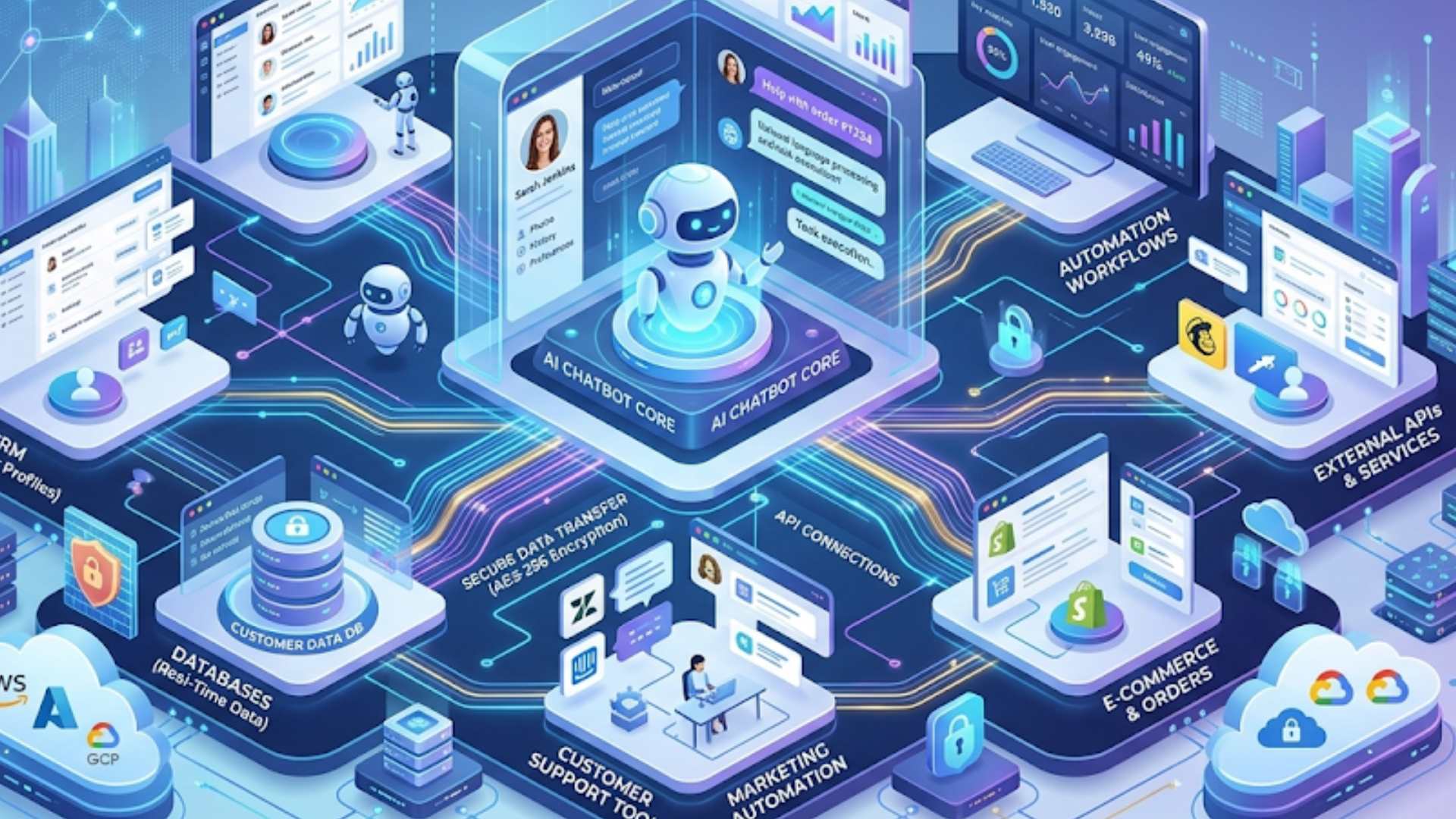
Think of the stack as a set of layers. Each layer has a clear job. You don't need to buy an all-in-one product. A small set of well-integrated components will get you far.
- Frontline interfaces - chatbots, web widgets, email, voice, and messaging platforms.
- Orchestration and routing - ticketing system, triage rules, escalation, and queue management.
- AI services - natural language understanding, response generation, retrieval augmented generation, embeddings, and classification models.
- Knowledge base and content - curated articles, product documentation, release notes, and playbooks.
- Telemetry and analytics - conversation logs, CSAT, SLA dashboards, and model performance metrics.
- Security and governance - data protection, access controls, audit trails, and model monitoring.
Put another way, the stack combines experience channels, intelligence, operations, and oversight. Each adds value, and each needs clear integration points.
Core components and recommended tools
Here are the components I include in almost every AI support stack, with examples and why they matter.
1. Conversational interface
Start where your customers are. That might be web chat, WhatsApp, in-app chat, or voice. Choose tools that let you customize flows and capture context. Examples include customer-facing chat platforms and voice providers with programmable APIs.
Why it matters: the interface shapes the experience. A clumsy bot that loses context will annoy users and hurt adoption. Keep flows simple. Let users jump to a human quickly.
2. Ticketing and routing system
Your ticketing system is the operational heart. It handles escalation, SLA enforcement, and handoffs to human agents. Popular options include existing helpdesk software extended with AI, or modern AI helpdesk platforms that natively integrate classification and automation.
Pro tip: integrate AI to tag, prioritize, and summarize tickets, not to replace routing logic. AI should make triage faster, and humans should keep final control over complex or sensitive issues.
3. Knowledge base and content layer
AI chatbots perform poorly without clean, up-to-date content. A searchable, structured knowledge base is essential. Use content versioning, ownership, and feedback loops so articles improve over time.
In my experience, this is where teams under-invest. Spend time on content hygiene before you start feeding it into retrieval systems.
4. Retrieval and embeddings
Retrieval augmented generation is now the backbone of informed responses. Convert KB articles, manuals, and past tickets into vector embeddings. Use a vector store to find relevant snippets at query time.
Why this helps: it keeps the AI grounded in your content, reduces hallucinations, and speeds up response time. Many vendors offer managed vector stores that plug into LLM providers.
5. Language models and NLU
Language models power the conversational flow, classification, and summarization. You can use a combination of smaller classification models for NLU and larger LLMs for generation. Don't put every task on the biggest model - mix and match.
Example split: use a classifier for intent detection and an LLM for crafting customer-friendly responses when context requires it.
6. Automation and workflow engine
Once intents are detected and knowledge retrieved, automation executes actions: raise an internal ticket, update a CRM entry, issue a refund, or trigger a product escalation. The workflow engine speaks both to your support tooling and your product backend via APIs.
Keep automations auditable and reversible. I've seen automated refunds go out to the wrong customers because of a mapping error. Oops.
7. Analytics and monitoring
Track everything. Conversation logs, false positive rates for intent detection, average handling time, and CSAT correlation with AI interactions. The data helps you tune models and prioritise content updates.
Set alerts for performance regressions. If the intent classifier starts dropping accuracy, you want to know before customers notice.
8. Security, compliance, and governance
Customer data matters. Make sure you have data handling policies, encryption in transit and at rest, role-based access, and logging. Decide what data you can use to train models and what's off-limits.
Tip: maintain a single source of truth for PII handling. Having scattered rules across services creates security gaps and slows audits.
Integration strategy: build incrementally and iteratively
Don't rip and replace. The best deployments I’ve seen evolve in small, measurable steps. Start with low-risk automation and expand. Here's a five-step rollout plan I recommend.
- Discovery and mapping - audit channels, ticket volume, common issues, peak times, and SLA requirements. Map the current process end to end.
- Quick wins - automate repetitive, low-risk tasks like password resets, status checks, or KB article suggestions. These deliver fast ROI and build confidence.
- Introduce smarter triage - integrate classifiers to tag and prioritize tickets, and use automated summaries to speed agent context gathering.
- Deploy conversational AI - roll out chatbots with RAG for factual answers and soft handoff to agents when confidence is low.
- Optimize and expand - add voice, deeper automations, and proactive outreach based on usage patterns. Keep measuring and refining.
At each stage, define success metrics and keep change manageable. A big-bang rollout rarely goes well in support operations.
Example workflows: from simple to advanced
Here are three practical workflows you can implement. They scale in complexity but follow the same principles: capture context, try automated resolution, and escalate gracefully.
Workflow 1: Automated KB suggestion
- User opens web widget and types a question.
- Intent classifier runs and identifies a likely KB topic.
- Bot suggests one or two articles with short snippets.
- User clicks if helpful; otherwise the conversation escalates to a human with an auto-generated summary.
This is low-risk and often reduces tickets by 20 to 40 percent for common queries. Simple to implement and worth doing early.
Workflow 2: Smart triage and agent assist
- Email or chat arrives. A classifier tags intent and priority.
- Retrieval system pulls relevant KB and past tickets for context.
- System generates a candidate response and a concise summary for the agent.
- Agent reviews, edits if needed, and sends. The agent action is logged for training data.
This setup speeds up agents and reduces average handling time. The human in the loop keeps quality high while the model learns from edits.
Workflow 3: Automated resolution with conditional actions
- Customer reports a billing error via chat.
- Bot authenticates with a secure, tokenized flow and retrieves transaction history.
- If the issue matches a known refund pattern, the bot proposes a refund and asks for confirmation.
- On confirmation, the workflow engine issues the refund and creates an audit ticket for compliance.
This one is powerful but higher risk. Always pilot with strict guardrails and manual review thresholds before full automation.
Choosing vendors and technologies
There are lots of options. Choose based on integration flexibility, data residency requirements, support for retrieval augmented generation, and pricing transparency. Here are key questions to ask vendors.
- Can you access the model endpoints directly, or is everything locked in the vendor's UI?
- How do you secure and control sensitive data when calling the model?
- Does the platform support embeddings and vector search, or do you need separate services?
- Is there built-in observability and logs for model decisions?
- How do they handle model updates and rollbacks?
Mixing and matching is often the right call. Use a best-of-breed vector store, pair it with a model provider you trust, and plug them into your existing ticketing system via APIs. That approach gives you flexibility and prevents vendor lock-in.
Data strategy: the fuel for useful AI
Data is the most important asset you feed to your AI stack. Collect it thoughtfully and use it to improve both content and models.
Start by consolidating sources: KB, CRM notes, previous tickets, transcripts, and product telemetry. Clean and tag the data with metadata: author, last updated, product area, and confidence. This makes retrieval and governance far easier.
When building embeddings, chunk content wisely. Too large and search becomes noisy. Too small and you lose context. I usually start with 200 to 500 token chunks for most documentation.
Privacy note: remove or mask PII before storing data in vector stores. Consider synthetic examples for training where necessary. Keep a clear policy on what data is allowed for model training.
Evaluation and continuous improvement
Deploying AI is just the start. You need ongoing evaluation. I've seen teams treat deployment like a finish line. It isn't. It is a new operating mode.
Track these core metrics:
- Resolution rate for automated interactions
- Escalation rate to human agents
- Average handling time with and without AI
- Customer satisfaction and CSAT trends
- Model confidence vs actual accuracy
Run regular reviews. Keep a cadence for retraining classifiers and refreshing embeddings. Use agent edits as labeled data to improve both intent detection and candidate responses.
Common mistakes and how to avoid them
I've watched teams repeat the same errors. Here are the common ones and practical fixes.
Mistake: Rushing to automate complex cases
Fix: Start with simple, high-frequency tasks. Automate password resets or shipping checks before tackling account disputes.
Mistake: Using the LLM as the only source of truth
Fix: Use RAG and a curated knowledge base. Make sure AI answers can be traced to source documents.
Mistake: Poor content hygiene
Fix: Assign content owners, track article freshness, and add feedback loops so users can flag bad or outdated help pages.
Mistake: No monitoring of model drift
Fix: Log model predictions and compare them to human outcomes. Add alerts when performance drops for a critical intent.
Mistake: Not planning for security and compliance
Fix: Classify data by sensitivity and apply encryption, masking, and strict access policies. Involve your security team early.
Human in the loop: keep people where it matters
AI shines when it augments humans. Let models handle routine work and surface the important cases to your agents. Humans should focus on judgment, empathy, and complex problem solving.
Design interfaces that let agents take over smoothly. Give them context, confidence scores, and one-click actions that execute automations but require confirmation. When agents finish a conversation, capture the edits as training examples.
Cost control and ROI
AI costs scale quickly if you aren't careful. Models, especially large LLMs, cost more as usage grows. Vector stores, API calls, and data egress can add up. Track spend per ticket and measure cost savings from reduced handle time and ticket volume.
Practical ways to control cost:
- Use small models for classification and only call large LLMs for generation when needed
- Cache frequent queries or KB results
- Batch large jobs like re-indexing instead of doing them in real time
- Implement usage thresholds and rate limiting
When you can quantify time saved per ticket, the ROI math becomes straightforward. Include training and maintenance when projecting costs. AI systems need ops too.
Scaling and enterprise considerations
Enterprises have extra constraints: global data residency, complex SLAs, and integration with legacy systems. Plan for them early.
Key areas to address:
- Data residency and export controls
- Single sign-on and role-based access
- Logging and audit trails for compliance
- Change management and training for large agent teams
Don't underestimate the organizational work. Successful AI rollouts require program management, training, and operational playbooks that mirror how you run other IT projects.
Vendor lock-in and portability
Design for portability. Use standard interfaces where possible. Keep an exportable copy of embeddings and metadata so you can move vector stores if needed. Avoid proprietary workflows that bury business logic inside closed UIs.
I've seen support teams trapped by vendor-specific automation. When that vendor made an unexpected price change, migration became painfully expensive. Build with migration in mind.
Quick checklist before you start
Use this list to make sure you’re ready to build an AI customer support stack that scales.
- Mapped channels and volumes
- Clean, owned knowledge base
- Ticketing system with APIs
- Data security and PII policy
- Metrics and logging plan
- Pilot plan with success criteria
- Training plan for agents
If you have those pieces in place, you can move quickly without sacrificing control.
A simple starter architecture you can try this week
Want a minimal, practical setup? Here's a starter architecture that gets you real value fast.
- Use your existing web chat or a lightweight widget as the interface.
- Connect the widget to an NLU service that runs intent detection using a small classification model.
- When intent matches a common query, query a vector store that indexes your KB and return top snippets.
- If snippets resolve the issue, record the interaction and mark the ticket as auto-resolved with agent review flags.
- If confidence is low, escalate to a human with a short summary and relevant KB links.
That flow reduces basic tickets, builds a dataset of handoffs, and keeps humans in control. You can expand it later with action automation and LLM-generated responses.
Measuring success
Define success metrics before you deploy. Here are practical metrics I've used to measure impact.
- Ticket deflection rate
- Average handling time reduction
- Agent productivity improvements
- CSAT change after bot interactions
- Cost per resolved ticket
Run A/B tests where possible. Compare similar traffic windows to isolate the effect of automation. Small experiments provide clear evidence to scale efforts.
FAQs
1. What is an AI customer support stack?
An AI customer support stack is a combination of tools and technologies—such as chatbots, ticketing systems, AI models, and knowledge bases—that work together to automate and enhance customer support operations. It helps businesses deliver faster, more accurate, and scalable support.
2. How does Agentia improve customer support operations?
Agentia helps businesses transition from manual, reactive support to proactive AI-driven workflows by integrating chatbots, automation, and intelligent routing. It improves response times, reduces workload on agents, and enhances overall customer experience.
3. What are the key components of an AI customer support system?
The core components include conversational interfaces (chat/voice), ticketing and routing systems, AI models (NLU and LLMs), knowledge base, retrieval systems, automation workflows, analytics, and security layers.
4. How can I start implementing AI in my customer support?
Start with simple use cases like automated FAQs or ticket tagging. Then gradually introduce AI-powered triage, chatbot support, and workflow automation. Using platforms like Agentia can help streamline integration and speed up deployment.
How Agentia can help
If you want to speed up this work, Agentia provides tools and expertise to integrate AI into your customer support stack. We focus on practical, secure implementations that prioritize measurable outcomes. We help with everything from pilot design to production integrations and ongoing optimization.
Helpful links and next steps
- Agentia - company site
- Agentia blog
- hello@agentia.support
- Book your free demo today
Parting advice
Start small, measure everything, and keep humans in the loop. AI can remove drudgery and speed up support, but the work of designing good experiences still falls on people. When you pair clear operational processes with AI that is grounded in your knowledge base and data, you get predictable improvements in customer experience and cost.
If you want to talk through a plan tailored to your product and support mix, I'm happy to help. Small pilots and real metrics beat grand plans and empty promises every time.