Customer Service Automation Strategy: How to Build Your Roadmap
This blog presents a roadmap for customer service automation for small and medium businesses, emphasizing realistic planning over blanket automation. It argues you should start with clear outcomes, map current workflows, and prioritize high‑frequency, low‑complexity use cases. Key steps include choosing a stack with strong integrations, designing concise conversation flows and smooth agent handoffs, training AI on real ticket data, extending automation beyond chat, piloting and measuring KPIs (containment, CSAT, response time), and addressing governance and compliance. The guide highlights common pitfalls, offers a 12‑month scaling plan, vendor and kickoff checklists, and stresses keeping agents involved and customer trust intact.
If you are supporting a small or medium-sized business, you are likely very familiar with the chant, "automate everything"! Perhaps it is a bit tempting? The truth is, the biggest success in customer service automation often comes from creating a realistic plan that suits your team, your customers, and your product. It is definitely not a decision to replace people. Rather, it is a way to allow them to handle those difficult issues that customers really require human intervention for.
This guide provides a realistic roadmap for AI customer service automation. It will include steps examples common errors, and a simple timeline you can modify. In a way, this is the playbook that I wish someone had given me when I first had to select an AI chatbot for customer service. We will discuss strategy tools implementation, measurement, and scaling. When you finish, you will have a solid plan to develop a customer support automation program that lowers expenses, quickens response time, and increases satisfaction.
Why automate customer service now?
Let me be straightforward. Customers demand quick responses. And also they usually change their preference of channels during the day. At the same time your support demand increases; however your team size does not grow. Customer service automation powered by AI will allow you to respond to the increased demand without exhausting the team.
I usually hear these benefits most often:
- Respond to customer queries like order status, password resets, refunds, and returns faster.
- Decrease the ticket volume so that agents will have more time for the complex cases that result in customer revenue or retention.
- Cut down operational expenses through the automation of conversation and workflow that is spread out across your helpdesk and backend systems.
- Give users a uniform experience which fosters their faith in the company and reduces the risk of making mistakes.
However, automation will not turn your business around single-handedly. It needs to be a component of a plan that is based on business objectives, customer experience statistics, and the actual situation of the business. Think about what you want to achieve before you choose a tool
Start with outcomes, not tools
A frequent error is to choose an AI chatbot simply because it features a great demo. I have witnessed teams purchasing a solution, spending months integrating it, and then discovering that it doesn't even address the real problem.
First define clear outcomes.
- Ask yourself and your stakeholders: What measurable problem are we solving? e.g. reduce average handle time by 20 percent, cut email ticket backlog in half, improve first response time to under 30 minutes.
- Which customer journeys matter most? e.g. order tracking for e-commerce, onboarding for SaaS, returns for retail.
- How will we measure success? Think CSAT, resolution rate, containment rate, cost to serve, and employee satisfaction.
In a nutshell, your roadmap should be outcome-oriented. That will make vendor selection and priority setting a lot easier.
Step 1. Map current workflows and top use cases
First of all, before you automate anything, map out how support actually works today. Get in touch with front-line agents.
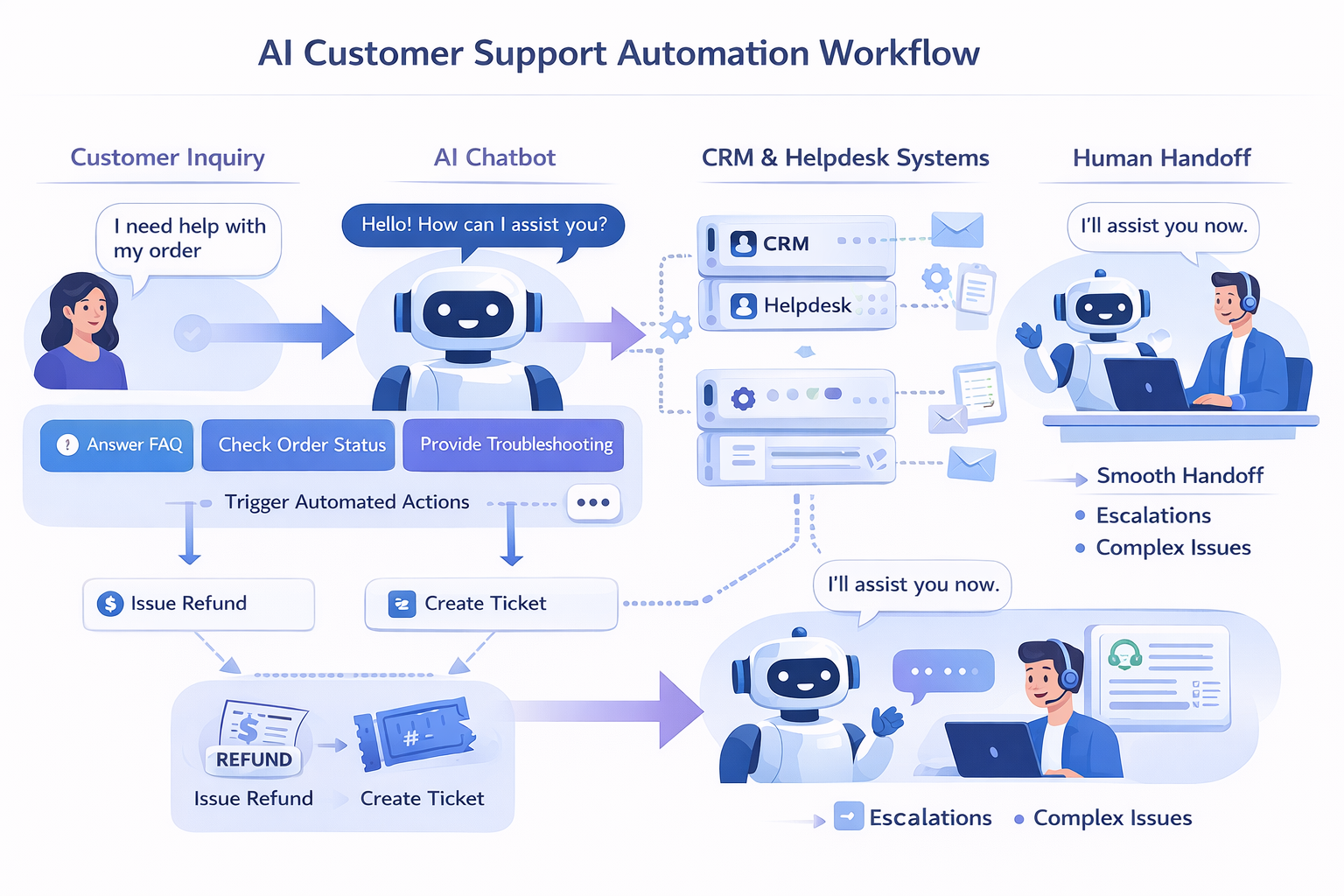
Focus on high-frequency, low-complexity tasks first. These are the best candidates for AI chatbot for customer service and helpdesk automation. Examples that usually belong in the first wave:
- Order status and shipment tracking
- Password resets and account unlocks
- Refunds and return initiation
- Plan and billing inquiries
- Product availability checks
Mapping tip: create a simple table with columns for issue type, average handling time, number of tickets per month, current first response time, and whether the task requires back-end system access. That gives you a quick prioritization matrix.
Step 2. Set KPIs for your customer service automation roadmap
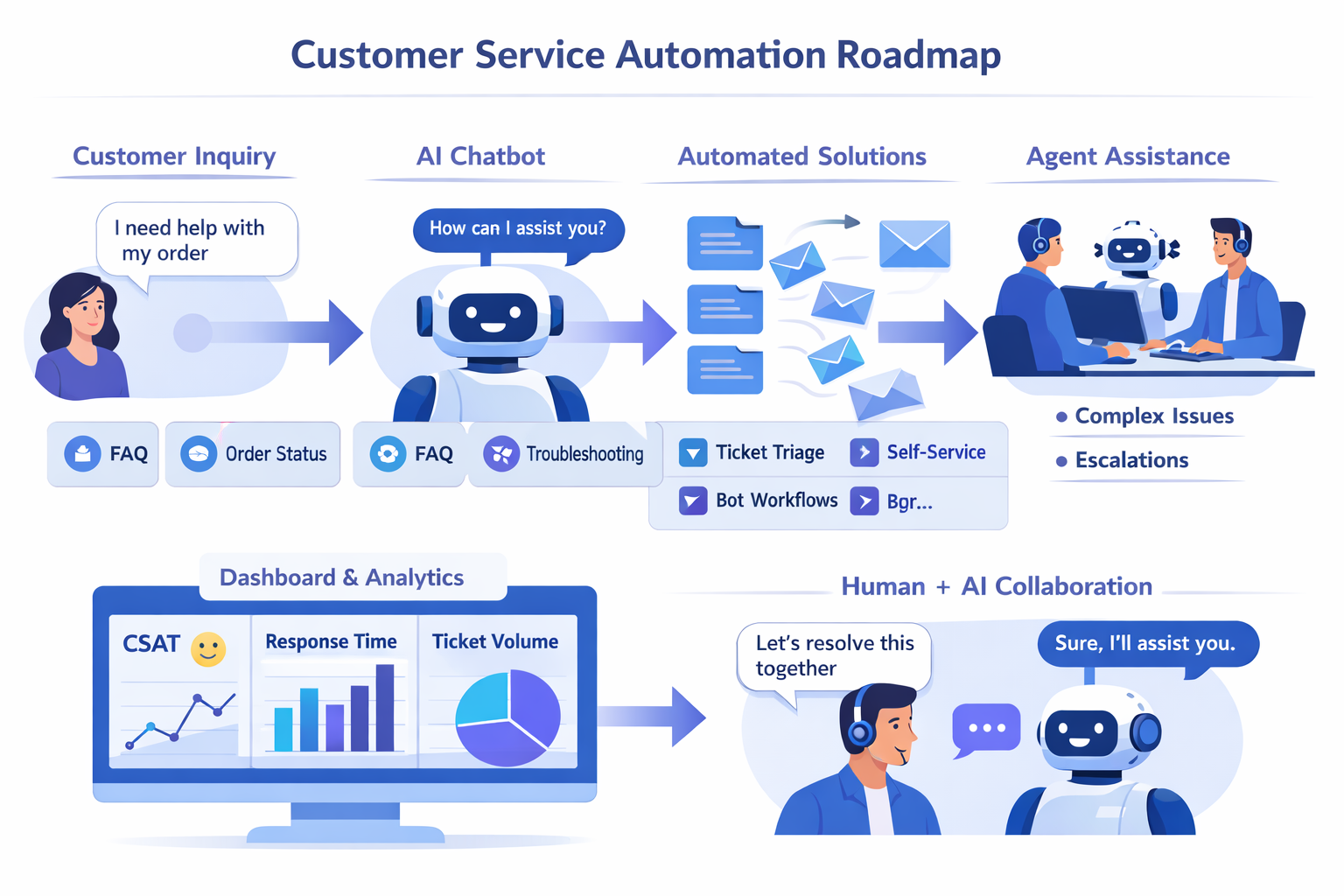
Pick a small set of KPIs and keep them visible. Change is hard to measure if you track dozens of metrics. My go-to set for customer support automation includes:
- Containment rate: percent of inquiries resolved by automation without agent handoff
- Average response time and first response time
- CSAT or NPS for automated interactions
- Ticket volume reduction for prioritized categories
- Cost to serve per ticket
Try to get baseline numbers before you deploy anything. If your baseline looks messy, that is OK. This is about progress, not perfection.
Step 3. Prioritize use cases with business impact
based on business impact It hardly makes sense to automate all initiatives blindly. A basic scoring methodology can help. Evaluate each potential automation based on three dimensions:
- Frequency: Is it a frequently occurring issue? Higher occurrences mean automation is more advantageous.
- Complexity: Does it require only fixing via rules and AI intent matching? If it is deeply complicated or involves lengthy interactions, it should be postponed.
- Business impact: If automated, will it significantly improve customer retention, conversion rates, or reduce costs? Give top priority to the ones with significantly measurable effects.
For instance, password resets are a very frequent, simple, and low risk operation. So, you should focus on it. However, a complex billing dispute that requires contract examination is rare and very complicated. For now automate triage but keep human involvement of the agent.
Step 4. Choose the right stack for AI customer support automation
Here is where things get choices. You need an AI chatbot for customer service, a helpdesk system, and workflow automation that connects to your backend systems. In my experience, integration capability matters more than bells and whistles.
What to look for:
- Native connectors to your helpdesk and CRM. Pulling ticket context into the chat reduces friction.
- Ability to use your knowledge base and grow it over time. The chatbot should learn from agent responses.
- Easy handoff to agents with context preserved. Nobody likes repeating the same problem twice.
- Analytics that show containment rate, fallbacks, conversation paths, and customer satisfaction.
- Security and compliance options for customer data. This matters especially for SaaS and finance customers.
By the way, agentia builds AI customer support tools that can plug into common helpdesks.
Step 5. Design conversation flows with humans in mind
Good conversation design is half psychology, half engineering. Your chatbot should be helpful, concise, and fail gracefully. Here are my practical rules:
- Start with a friendly greeting and a clear menu of options. If you offer too much free text from the start, you will get messy inputs.
- Use quick replies for common tasks like check order status or request a refund. They reduce typing and guide customers to resolution faster.
- Ask one question at a time. Avoid long forms inside chat. Break them into steps.
- If the bot cannot resolve within two or three turns, offer to transfer to an agent with context. Keep this handoff smooth and instant.
- Confirm before taking action. Example: "I can file a return for order 12345. Shall I proceed?" This reduces errors and refunds processed wrong.
Simple example flow for returns:
User: I want to return my order
Bot: Sure. Can you give me your order number?
User: 12345
Bot: Thanks. I see an eligible return. Do you want a refund or an exchange?
User: Refund
Bot: Got it. I can start the refund and email you the return label. Proceed?
User: Yes
Bot: Done. Label sent. Anything else I can help with?
See how the bot asks one thing at a time and confirms actions? Small details like that keep customers happy.
Step 6. Train your AI with real data
AI works best when it sees your actual tickets and chat logs. Use past conversations to build intents and examples. In practice, you will need to clean and label data. Yes, it is a little tedious, but it pays off.
Training tips:
- Start with the top 10 intents. They cover the majority of volume for many businesses.
- Label variations of the same question. People ask for "refund", "money back", "return my order" in many ways. Teach the model those variants.
- Periodically review fallbacks. If the bot asks for clarification too often, add examples or improve prompts.
- Keep a small test set aside so you can measure real improvement after retraining.
Avoid this pitfall: training data that mixes agent-speak and customer language. They are different. Use customer phrasing for intents and agent phrasing for suggested responses or macros.
Step 7. Build automation beyond chat
Customer service automation is not only chatbots. Workflow automation connects the chat or ticket to the systems that actually do the work. Think of automations that:
- Create, update, and resolve helpdesk tickets programmatically
- Trigger refunds and return labels in your e-commerce platform
- Sync customer account changes with your CRM
- Send follow-up surveys or satisfaction requests automatically
Real life example: if the chatbot approves a refund, the automation should: This reduces human intervention and leads to faster order processing.
Step 8. Pilot, measure, iterate
Test, analyze, and improve. Do a small test before you enable automation across all your channels. Choose one channel, one use case, and a limited number of customers. Tests provide you with genuine feedback without putting your entire support operation at risk.
Common pilot targets:
- Order status via web chat for returning customers
- Password resets initiated via in-app chat
- Billing FAQs via email auto-replies
Measure the KPIs you set earlier. Watch containment rate and CSAT closely. Collect agent feedback. In my experience, agents are the best source of signals on how the bot should escalate or what information it needs to add.
Step 9. Train agents and define new workflows
Automation changes agents' work. They will see fewer routine tickets and more complex problems. That is good, but only if you prepare them.
Important items to address:
- Create clear agent playbooks for escalations. Include steps and required information the bot should pass along.
- Train agents on reading automated transcripts and context passed from the bot.
- Adjust SLAs and staffing based on the new mixture of ticket types.
- Keep agents involved in improving the bot. Short review sessions every week help tune scripts and training data.
If you ignore agent experience, automation will feel like a burden, not a relief.
Step 10. Governance, privacy, and compliance
Data governance matters. You are using customer data to train AI, and regulations vary by region. My rule of thumb is to be conservative and transparent.
- Mask or exclude sensitive data from training unless you have a secure process.
- Keep clear records of what data was used and who can access it.
- Inform customers when transcripts may be used to improve services, and provide an opt-out where needed.
- Work with legal and security teams early when connecting to payment systems, PII, or medical data.
Skipping this step can lead to compliance headaches and loss of customer trust.
Common mistakes and how to avoid them
Here are pitfalls I see repeatedly, and simple ways to avoid them.
- Automating everything at once. Start small and expand. Focus on impact.
- Poor handoff. Always pass context to agents. Requiring customers to repeat themselves is a guaranteed frustration.
- No measurement. If you don't track containment or CSAT, you will not know if the automation is working.
- Ignoring edge cases. Build fallback flows for ambiguous inputs, and keep agent backup ready.
- Letting knowledge bases go stale. Automation depends on up-to-date answers. Schedule content reviews.
These are practical fixes. They do not need heavy engineering to implement, but they need process discipline.
Adjusting your roadmap for customer service automation
Once your pilot shows wins, scale in waves. I suggest a phased approach over 12 months:
- 0 to 3 months: Pilot one channel and two to three intents. Measure containment and CSAT.
- 3 to 6 months:Extend to several channels and connect with major back-end systems for ticket generation and delivery.
- 6 to 9 months: Utilize multi-step processes and conditional logic to automate more sophisticated returns. Begin A/B testing terminology and prompts.
- 9 to 12 months: Improve, include multilingual support, and use predictive automation (such as proactive contact for late shipments).
Keep in mind to record both successes and disappointments. That aids in securing funding for the following stage.
Measuring returns on customer support automation
Management wants the figures. One easy way to calculate ROI is as follows:
- Determine present cost per ticket as total support expense divided by monthly ticket count.
- Determine the ticket reductions made possible by automation. Your total ticket count falls by 12% if, for instance, automation resolves 40% of the tickets for a category comprising 30% of volume.
- Consider time saved from speedier resolutions and decreased escalations.
- Reduce automation expenses: licensing, integration, and continuous maintenance.
If the math is messy, focus on leading indicators first: containment rate, reduced handle time, improved CSAT. They often translate into hard savings once you scale.
Real-world examples that work
Let me share a couple of simple examples I have seen work well in practice.
E-commerce returns and refunds
Problem: High ticket volume around returns, with manual refund processing that takes agents 10 minutes per ticket.
Solution: An AI chatbot handles the initial triage, verifies eligibility, offers refund or exchange, and triggers an automation that creates a refund in the payments system and emails a return label. Agents only intervene for exceptions or high-value customers.
Result: Containment rates of 60 to 70 percent for returns, dramatic reduction in agent time spent on refunds, and faster customer refunds which improves CSAT.
Questions regarding SaaS onboarding and billing
Issue: New users pose the same onboarding questions, and billing queries are boring but demand close context.
Solution: Integrate an AI virtual assistant supporting helpdesk automation delivering account context to agents. Common billing inquiries and step-by-step onboarding assistance are handled by the bot. Complex arguments go to a billing specialist with pre-filled information.
Result: Faster onboarding, fewer support calls, and improved agent focus on troubleshooting and upselling talks.
Maintaining the human element
Automation should seem human rather than robotic. Worth concentrating on, that is simpler said than done. Use plain language. Provide tone modifications for many listeners. Always show and readily available the human alternative.
One trick: let customers choose voice or tone at the start. Some want brisk, transactional answers. Others prefer more empathetic language. Adjusting the bot's responses based on this preference is surprisingly effective.
Ongoing optimization and governance
Your chatbot will not be perfect out of the gate. Plan for continuous improvement.
- Weekly reviews for the first 90 days. Look at fallbacks and reassign training examples.
- Monthly business reviews with stakeholders to look at KPIs and decide next priorities.
- Quarterly content audits for the knowledge base and canned responses.
- Annual security and compliance review of data used in training.
These steps keep your automation accurate and aligned with business needs.
Vendor selection checklist for AI customer support tools
When evaluating vendors, here are the practical questions to ask. I have used these in RFPs and saved us a lot of time.
- How does the system integrate with your helpdesk and CRM? Can it push and pull context and attachments?
- Can the chatbot use and update your knowledge base? How easy is content management?
- What analytics are available out of the box? Can you see conversation paths and funnel drop-offs?
- How does escalation work? Does the agent receive a transcript and suggested responses?
- What security, compliance, and data retention controls are available?
- How is the AI trained and retrained? Do you have to provide data labeling, or can the vendor assist?
- What are the deployment timelines and support SLAs?
Quick checklist to get started this week
If you want momentum fast, here is a simple checklist you can complete in one week.
- Pull last 30 days of tickets and identify top 5 recurring issues.
- Calculate baseline KPIs: ticket volume, average handle time, CSAT.
- Choose one use case for a pilot and define success criteria.
- Talk to at least two vendors and ask for a scenario demo using your data.
- Assign a cross-functional owner and a weekly cadence for reviews.
Small steps build credibility quickly. I have used this checklist to convince skeptical leadership in multiple companies.
Faqs
Final thoughts
Building a customer service automation roadmap is part strategy and part execution. Keep it practical. Automate the obvious, measure the impact, and iterate. Treat agents as partners in the effort and protect customer trust with good governance.
If you're thinking about next steps and want to see an AI customer service automation platform in action, agentia builds tools designed for small and medium-sized businesses that balance automation with smooth human handoff. A quick demo can help you visualize how a pilot might look for your team.
Find more: Hybrid AI Voice Assistant for Modern Business Communication