Hybrid AI Voice Assistant for Modern Business Communication
This blog argues that hybrid AI voice assistants, combining automated speech tech with human oversight, are the pragmatic way to scale voice for customer experience. It explains differences from legacy IVR and pure AI, outlines core components (speech-to-text, NLU, dialog manager, TTS, human-in-loop, orchestration), common use cases (support triage, sales qualification, billing, scheduling, outreach), benefits for containment, handle time, FCR, CSAT and agent productivity, and gives a phased pilot roadmap, design and security tips, pitfalls, metrics, vendor guidance and a checklist. Purpose: a practical playbook for leaders to implement conversational voice without breaking things. It emphasizes starting small, measuring, and iterating quickly.
If you are a SaaS entrepreneur, are heading a CX team, or embedding customer experience in a product, you may have wondered if AI can take over voice at scale. I receive that question quite often. To put it briefly, the answer is yes, but not in the way most people imagine. What really makes a difference is a hybrid model that combines AI and humans.
In this post, I’ll walk you through what a hybrid AI voice assistant for business actually is, how it differs from pure AI and legacy IVR, and where it makes the most impact. I’ll also share practical implementation tips, common mistakes I see, and how to measure success. Think of this as a playbook for leaders who want to add conversational AI voice assistant capabilities without breaking things.
What is a Hybrid AI Voice Assistant?
At its core, a hybrid AI voice assistant blends automated speech tech with human oversight. The AI handles routine, predictable tasks. Humans step in for complex, sensitive, or high-value interactions. That mix gives you speed plus subtlety. It’s like having a dependable teammate who knows when to ask for help during two way video streaming.
Here’s a simple breakdown:
- AI handles common queries such as account balance, appointment confirmations, and basic troubleshooting.
- Humans take over when conversations need empathy, negotiation, or judgment.
- Supervision and continuous learning connect the two so the system improves over time.
I’ve noticed that people often confuse hybrid systems with either full automation or just call center augmentation. Hybrid voice automation sits between those extremes. It’s a partnership, not a replacement.
Why Hybrid Beats Pure AI and IVR
Legacy IVR systems are rigid. They follow menus and touch tones. Pure AI can be flexible, but it still struggles with nuance, frustration, and exceptions. A hybrid AI voice assistant for customer support gives you the best of both worlds.
Here’s how they compare in real terms:
- IVR offers consistency but a poor experience. People get stuck in menus and hang up.
- Pure AI offers speed but can misunderstand context or escalate unnecessarily.
- Hybrid systems reduce handoffs, improve containment, and keep humans in the loop for tricky bits.
In my experience, teams that jump to pure AI without a fallback regret it. Customers expect fast answers, but they also expect empathy. If you automate everything and fail at empathy, your CSAT drops fast.
Core Components of a Hybrid AI Voice Assistant
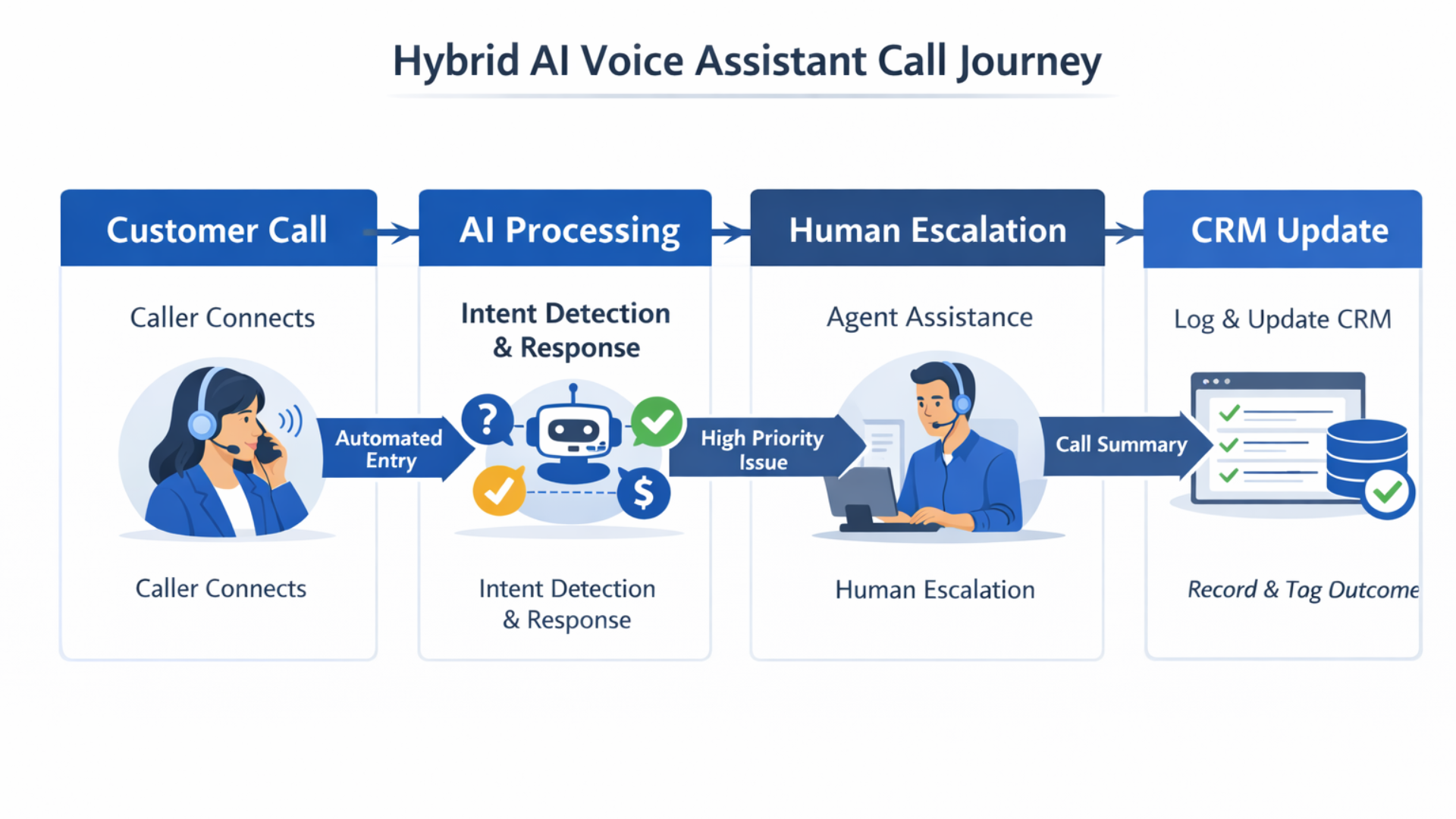
Implementing a hybrid voice assistant isn’t magic. It’s a stack of components working together. Here are the essential parts.
- Speech to Text converts spoken words into text. Accuracy here matters. Garbage in, garbage out.
- Natural Language Understanding detects intent and extracts key data. This is where the conversational AI voice assistant actually understands what a caller wants.
- Dialogue Manager decides what happens next. Should the AI respond? Route to an agent? Schedule a follow up?
- Text to Speech delivers responses. Voice quality and tone shape the customer experience.
- Human-in-the-Loop lets agents intervene in live calls or review recordings and edit responses. This part drives continuous improvement.
- Orchestration Layer connects the assistant to CRM, ticketing, billing, and other backend systems so the assistant can take actions, not just talk.
When these parts are integrated, you get business voice automation that actually reduces friction instead of adding it. Agentia, for example, focuses on building systems that tie conversational AI to core business systems so calls become transactions, not just conversations.
Common Use Cases for Startups and CX Teams
Hybrid voice automation works across industries. Below are common places I’ve seen big wins.
- Customer Support Triage The assistant gathers basic info and resolves simple issues. If it can’t, it routes to a human with context. This reduces average handle time and improves first contact resolution.
- Sales Qualification The assistant has pre-sales conversations to qualify leads, book demos, and gather intent data. Sales teams get warmer leads and fewer no-shows.
- Billing and Payments Automate balance checks, payment links, and simple transactions. Humans handle disputes and exceptions.
- Appointment Scheduling Voice assistants set appointments, confirm reminders, and reschedule. No more endless back and forth.
- Outbound Outreach Use AI to make personalized calls at scale. Humans step in when a conversation starts to require negotiation or persuasion.
These examples stay simple on purpose. Small, targeted wins usually pay for a broader rollout. One mistake I see is trying to automate every possible touchpoint at once. That’s a recipe for slow adoption and messy metrics.
How Hybrid Voice Automation Improves Metrics
You’ll want numbers. Here are the metrics hybrid systems move and how.
- Containment Rate goes up because AI handles more routine interactions end to end.
- Average Handle Time drops since humans get only the complex parts of calls.
- First Contact Resolution improves with better routing and context passed to agents.
- Customer Satisfaction tends to rise when people don’t have to repeat themselves and when agents have context on hand.
- Agent Productivity increases as they focus on higher value work instead of repetitive tasks.
Remember that numbers depend on how you implement. If your intent detection is low quality, containment won’t improve. That’s why human supervision and iterative training are crucial.
Implementation Roadmap: From Pilot to Production
Start small and iterate. I recommend a phased approach that balances speed with control.
- Pick a high impact use case like billing or appointment scheduling. These are predictable and have clear KPIs.
- Build a lightweight pilot with clearly defined intents and fallback paths to humans. Keep the initial scope under 10 intents.
- Instrument thoroughly: Track containment, handoff reasons, error rates, CSAT, and time saved.
- Run the pilot live with a subset of traffic and collect feedback from agents and customers.
- Iterate, fix common misunderstandings, add edge cases, and retrain intent models using real conversations.
- Scale gradually. Add more intents and integrate deeper with CRM, billing, and analytics.
People often rush from step one to full deployment. Don’t do that. Treat early pilots as experiments. You’ll save months of rework and a lot of frustrated customers.
Real Example: Simple Payment Collection
Let me share a concrete example I’ve worked on. The problem was simple. Missed payments created friction and high call volumes. Agents spent too much time on repetitive chase calls.
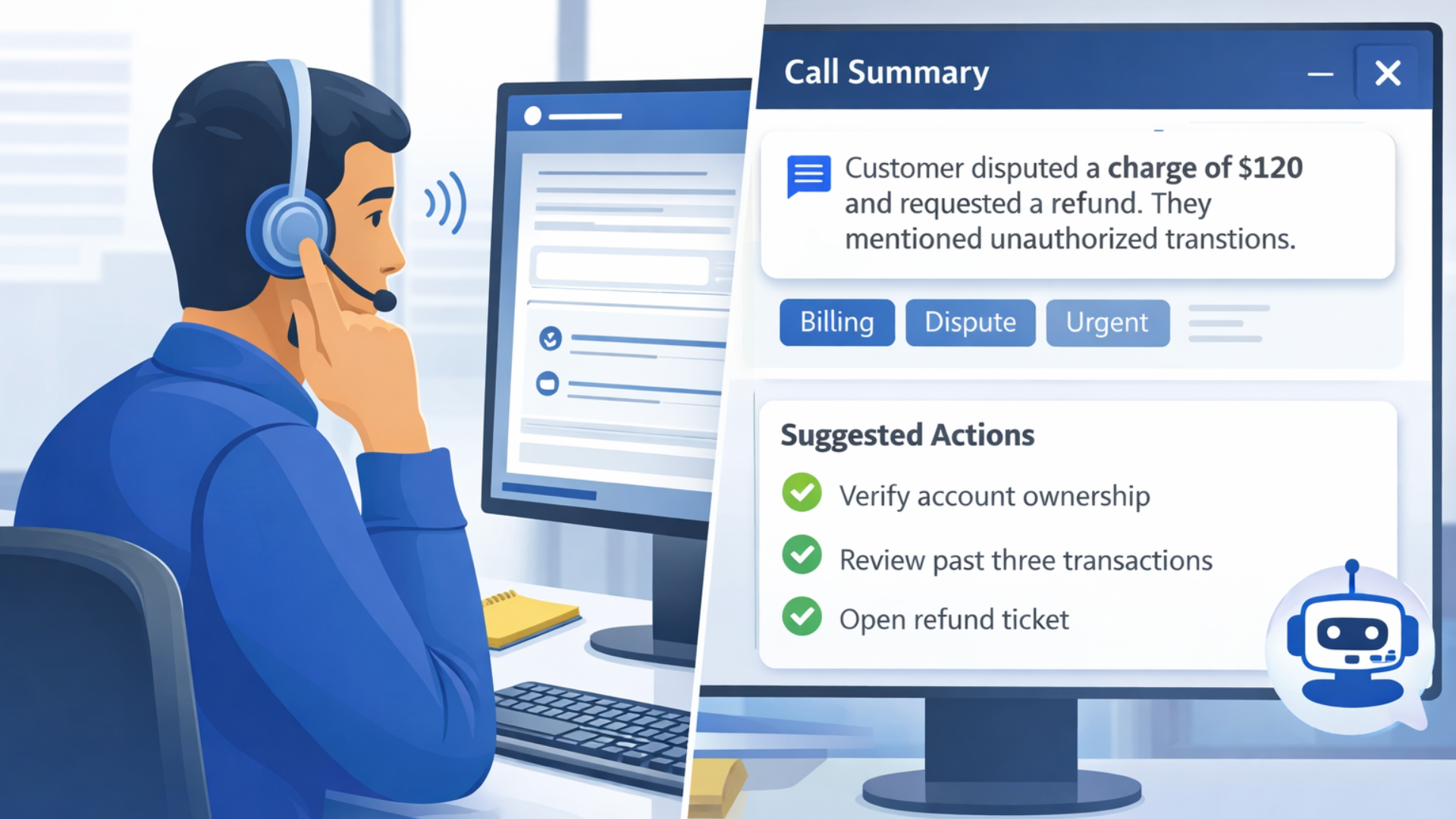
We built a hybrid AI call assistant for companies to handle initial outreach. The AI called, verified identity, offered a payment link, and scheduled a follow up if needed. If the customer had questions or disputed the charge, the system passed the call to a human with all the context.
Results looked like this after six weeks:
- Containment increased by 45 percent
- Agent time on tasks dropped by 30 percent
- Collections improved because payment links were sent in-call
Simple scripts. Clear handoffs. That combination made the automation practical and measurable. The team could see wins and then gradually expanded the assistant to other billing scenarios.
Common Pitfalls and How to Avoid Them
Here are mistakes I see over and over. I’ll tell you what to watch for and how to address it.
- Trying to automate everything. Start with a few high value flows. If you try to automate every interaction, you’ll dilute accuracy and lose stakeholder support.
- Poor fallback experience. If handoffs to humans lack context, customers repeat themselves. Always pass the conversation history and extracted data to the agent.
- Neglecting voice design. Voice is different from chat. Use short confirmations, natural pauses, and easy exit options. Test the voice scripts with real users.
- Ignoring agent feedback. Agents are your best source of training data. If you don’t loop them in, the system won’t learn what it needs to.
- Underestimating edge cases. Plan for out of scope requests, background noise, and accents. These reduce speech to text accuracy if unaccounted for.
A quick aside. You’ll hear vendors promise near perfect speech recognition. That’s not a useful metric on its own. Look at how recognition supports resolution and how often humans need to step in.
Design Tips for Better Conversations
Voice UX matters. These are small, practical choices that make interactions less painful.
- Open with a clear purpose. People want to know why you called within the first 10 seconds.
- Confirm critical details. When a caller gives an account number or agrees to a payment, repeat it back.
- Offer an easy escape hatch. Let people speak to an agent or press zero at any time.
- Use short turns. Long monologues feel robotic. Keep exchanges natural and concise.
- Keep language plain. Avoid jargon. People don’t want to parse corporate speak while they’re on a call.
These choices sound obvious, but teams skip them under pressure. The result is a voice assistant that feels like a robot reading a script. Don’t let that be you.
Security, Privacy, and Compliance
When you add voice automation, you also add data risk. Phone interactions can include sensitive data such as payment details, personal identifiers, and health information.
Do the following:
- Encrypt call recordings and transcripts both in transit and at rest.
- Mask or tokenise payment information and avoid storing full card numbers in transcripts.
- Implement role based access so only authorized people can review recordings.
- Follow regional regulations like GDPR, CCPA, and industry rules such as PCI if you handle payments.
- Keep an audit trail of AI decisions and human overrides for accountability.
In many projects I’ve advised, compliance requirements shaped architecture from day one. It’s easier to bake privacy into the design than to bolt it on later.
Measuring Success
Pick a few metrics and track them consistently. Too many KPIs create noise. Focus on what matters to your business.
Core metrics I recommend:
- Containment rate
- Average handle time for humans
- Escalation reasons
- CSAT or NPS from callers
- Operational cost per resolved call
Also track qualitative signals. Agent notes, call transcripts, and customer comments reveal gaps that metrics miss. I like to run weekly review sessions where product, engineering, and CX teams listen to a few calls together. Those reviews often spark the best improvements.
How to Pitch This to Executives
Executives care about outcome, not tech. Frame hybrid voice automation in terms they understand.
- Start with the problem and the dollar impact. How much is repeat support costing us? How much revenue is at risk from no-shows?
- Propose a small pilot with clear success criteria and a timeline. Avoid asking for a big upfront budget.
- Highlight risk mitigation. Show how humans remain in control and how compliance is assured.
- Show quick wins. A 30 day pilot with measurable improvements is far more convincing than theoretical benefits.
Executives want to see ROI. Be ready with numbers and a realistic rollout plan. If you can show reduced agent load and improved conversions within two months, you’ll get buy in fast.
Cost, Licensing, and Vendor Choices
Costs vary depending on whether you build or buy. Building gives control but costs time and engineering cycles. Buying gets you faster time to value but requires careful vendor evaluation.
When evaluating vendors, consider:
- How well the vendor integrates with your systems, such as CRM and billing.
- Whether the vendor supports human-in-the-loop workflows and real time handoffs.
- Model transparency and the ability to access transcripts and logs for training.
- Security and compliance capabilities.
- Pricing structure. Pay per minute, per interaction, or flat license models impact ROI differently.
For many startups, a hybrid approach using a vendor like Agentia to handle orchestration and human handoffs while integrating with existing tools hits the sweet spot. It avoids 12 months of engineering work and delivers measurable results quickly.
Future Trends to Watch
Voice technology is evolving fast. A few trends I’m watching closely:
- Better contextual understanding so assistants can hold longer, coherent conversations.
- More natural voices that vary tone with context, making calls feel less robotic.
- Edge compute and on device processing to improve latency and privacy.
- Deeper CRM integrations for personalised conversations at scale.
- Hybrid models where AI suggests responses and humans approve them in real time.
None of these trends replaces the need for human judgment. They just make the hybrid approach more powerful and cheaper to run.
Read more:
Quick Checklist for Getting Started
Here’s a simple checklist you can use when planning your first pilot.
- Choose a use case with clear ROI and under 10 intents.
- Design a short script that opens, confirms, and offers an easy route to an agent.
- Set up speech to text and intent detection with human review enabled.
- Instrument metrics for containment, handle time, CSAT, and escalation reasons.
- Run a small live pilot, gather feedback, and iterate weekly.
Small steps lead to momentum. Don’t try to be perfect on day one.
Conclusion
Hybrid AI voice assistants are practical and powerful when you build them thoughtfully. They let you automate the mundane while keeping humans where they matter. That leads to better customer experiences, lower costs, and happier agents.
I’ve seen teams transform operations by starting with one simple use case, measuring results, and expanding from there. If you’re a SaaS founder, startup owner, or CX leader thinking about voice automation, aim for hybrid. It’s the pragmatic path to scale.
Frequently Asked Questions.
1: Can I really make a personal website for free?
Yes. You can create a fully functional personal website for free using tools like Carrd, Google Sites, Notion, or Wix. Free plans usually include a subdomain and basic features, which are enough for portfolios, resumes, or link-in-bio pages. You only need to pay later if you want a custom domain or advanced features.
2: Which free website builder is best for beginners?
If you want something fast and simple, Carrd is the easiest option, especially for one-page or link-in-bio websites. Google Sites works well if you need multiple pages with zero design effort. Wix offers more flexibility but adds branding on the free plan. Pick based on your goal, not features.
3: Do free personal websites look unprofessional?
No, if done right. A clean layout, clear headline, strong projects, and easy contact method matter more than the platform. Many free personal websites look professional enough for students, creators, and early-career freelancers. The site looks unprofessional only when it is cluttered, vague, or poorly written.
Helpful Links & Next Steps
- Agentia — Company Website
- Agentia Blog
- Book a Meeting Today
- Agent Hub: One Platform to Manage and Scale Multiple AI Agents
If you want to talk through a use case or run a short pilot, Book a Meeting Today. I’m happy to walk through a plan that fits your team and timeline.