AI Speech Technology Use Cases Driving Business Innovation
This blog is a practical guide for product, operations, and support leaders on evaluating, piloting, and scaling AI speech and voice technologies. It argues teams should start with measurable, high‑impact use cases like transcription, real‑time agent assist, self‑service voice, conversational IVR, analytics, summarization, QA, biometrics, translation, and internal assistants to improve customer experience, reduce cost, and boost efficiency. The author explains success metrics, quick experiments, architecture choices (cloud/edge/hybrid), and an implementation playbook (30/60/90 days). Common pitfalls focusing on tech over problems, data quality, latency, privacy, and alert overload are highlighted, along with vendor vs. build guidance and monitoring best practices and next steps.
Voice and speech AI are developing at a rapid pace. It doesn't matter if you are a product leader, customer support manager, or platform architect; one of the issues that might be on your mind is when selecting the elements of your business for the implementation of AI speech technology and which ones to reserve for the future. I get asked that question a lot. I believe that picking particular use cases leading to a better customer experience, cost savings, or increased operational efficiency is the best way to go.
Here, the author reviews the practical AI speech technology use cases, what they deliver, common pitfalls, and how to evaluate and deploy solutions. Ill throw in a few simple examples that you can easily test and reveal what I've seen works (and what usually causes teams to stumble). If you want to skip ahead, at the bottom there are links to learn more or book a demo with Agentia.
Why speech matters now
People talk. Everyone knows that customers prefer to speak rather than type when they want to get fast answers, especially when interacting with tools powered by an AI ad maker and modern voice automation systems. A voice is quicker for a lot of tasks, and it is also more natural for people who are on the go. On top of that, if you combine that with continuous progress in AI speech recognition and natural language understanding, you come up with a set of handy tools that help reduce friction and cut costs.
Here are the main reasons why teams put their money in AI speech technology nowadays:
Faster resolution of customer issues, which lessens the time of the transaction.
Automated transcription and summarization, which releases agents from the burden of manual notes. Real, time agent assist, which leads to increased first contact resolution and compliance.
Self, service voice options, which help to move away from human channels for routine interactions. Speech analytics, which turns conversations into measurable business insights.
In fact, all of these contribute to one obvious result: getting better outcomes at a lower cost. This is the message that decision makers want to hear.
High, impact use cases for AI speech technology
I'm pointing out use cases in the list below that bring measurable value over and over again. I arrange them from quick wins to strategic initiatives. Each item provides a brief description of what the solution does, how success can be measured, and a small example that you can experiment with without large financial input.
1. Speech to text AI for transcripts and search
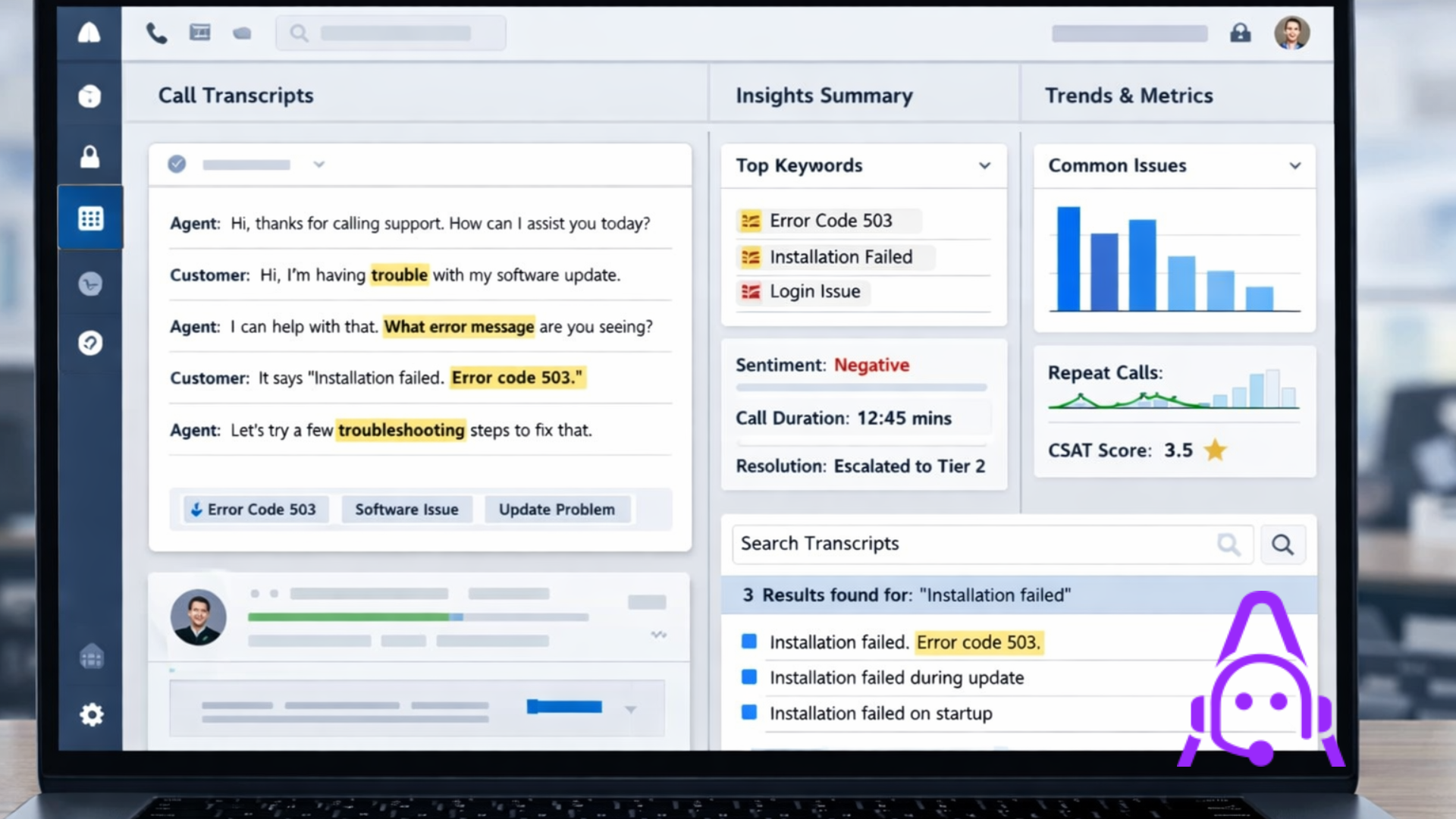
Transcribing is the simplest use case. Recordings of calls, meetings, and voice notes can be converted into searchable text. This way, you are able to use knowledge that was previously only stored in audio.
How teams benefit:
- Searchable call histories for compliance and QA.
- Faster onboarding by letting new hires read annotated calls.
- Better knowledge base articles built from real customer language.
Success metrics to track: transcription accuracy, search hit rate, and time saved on note-taking.
Quick example: Set up speech to text AI on a random week of support calls. Export transcripts and search for the top 10 phrases customers use for a particular issue. Use those phrases to update help center articles and measure a drop in repeat tickets.
2. Real-time agent assist and prompts
Imagine an assistant that listens, summarizes, and suggests responses while an agent is on a call. I have seen this reduce average handle time and increase compliance in regulated conversations.
Benefits:
- Suggested responses and knowledge base links in real time.
- Automatic reminders for legal or industry-specific disclosures.
- On-the-fly scoring or coaching prompts for new agents.
Measure: impact on handle time, escalation rate, and compliance violations.
Simple pilot: Roll out agent assist to one team and track whether escalations drop. Keep prompts short and relevant, and watch for alert fatigue. Agents will tell you if suggestions are helpful or annoying, and they will tell you fast.
3. AI voice assistants for self-service
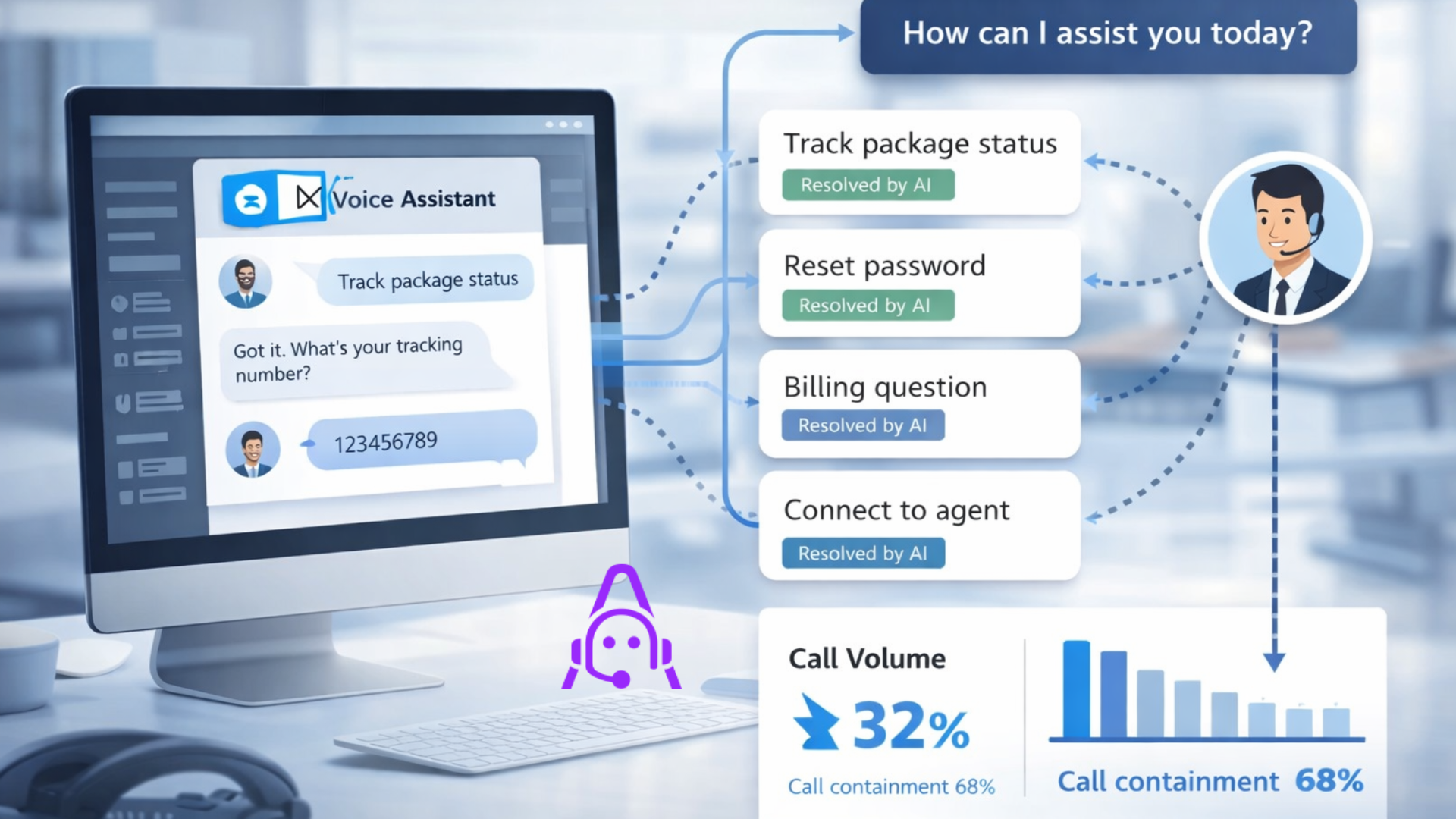
Customers want to figure out simple problems on their own rather than waiting on hold. AI voice assistants can take care of the routine tasks such as checking the status of an order, resetting a password, or making an appointment.
Why it matters: self, service has a potential to significantly decrease the number of incoming calls and the cost per interaction.
Metrics to use: self, service effectiveness measured by containment rate, call deflection, and customer satisfaction.
Try this: Use a conversational AI flow to replace only one common IVR path. The AI flow can ask one or two questions, solve the problem, and if handing off is required, do it nicely. Let the language be natural and don't make the paths too long.
4. Conversational IVR and natural language routing
Move away from long touch-tone menus. Use conversational AI to route calls using natural language. This reduces misroutes and gets customers to the right team faster.
Benefits:
- Shorter customer time to reach the right agent.
- Fewer transfers and lower average handling time.
- More accurate routing based on intent instead of menu selection.
Tip: Capture the customer intent as structured data and pass it to the agent's desktop to reduce repetitive questions.
5. Speech analytics for insights and coaching
Speech analytics turns conversations into business signals. It finds trends you would miss with manual QA samples.
Use cases:
- Detecting product issues early by tracking complaint phrases.
- Monitoring agent behavior for coaching opportunities.
- Assessing sentiment trends that correlate with churn.
Measure: number of actionable alerts, time to detect trends, and improvement in agent KPIs after coaching cycles.
Practical tip: Start with 5 to 10 signals that matter to your business. Too many alerts dilute focus.
6. Automated call summarization and follow-up
Summaries save time. Rather than read a full transcript, stakeholders get short summaries that highlight decisions, next steps, and action owners.
Benefits:
- Faster handoffs between teams.
- Better meeting and call follow-through.
- Reduced time writing post-call notes.
Example: Use an automated summary to populate ticket fields or CRM notes. That single change cuts manual entry time and reduces mismatched information between systems.
7. Quality assurance automation
Human QA teams catch only a fraction of calls. AI speech technology scales QA by flagging risky calls, compliance breaches, and missed script elements.
What to expect:
- Higher coverage for QA checks.
- Faster root cause analysis for recurring issues.
- Better calibration across QA reviewers.
Make it actionable by focusing on a few compliance checks initially. Examples include whether the agent offered a required disclosure or whether pricing was quoted accurately.
8. Voice biometrics and authentication
Voice biometrics can speed up authentication and reduce fraud. It uses unique voice features to confirm identity, avoiding long security questions.
Keep in mind: build a fallback path for noisy environments and consent requirements for voice enrollment.
Metrics: reduction in authentication time, fraud incidents, and call abandonment during authentication.
9. Multilingual support and live translation
Supporting multiple languages by hiring for each language is expensive. AI speech recognition and translation let you scale language support more affordably.
Use cases include customer support, global sales calls, and internal knowledge sharing across regions.
Tip: Always validate translation quality for domain-specific terminology. Predefined glossaries help keep product and policy terms accurate.
10. Field worker and internal voice assistants
Voice is not just for customers. Field technicians, warehouse staff, and frontline employees benefit from hands-free interfaces that return checklists, confirm steps, or log issues.
Example: A technician uses voice to check an asset history and log a repair while both hands are busy. That increases accuracy and speeds up repairs.
How AI speech drives efficiency and cost reduction
Companies invest in voice AI for a simple reason. It saves money and improves outcomes. Here are the mechanisms that produce those results.
- Automation reduces the volume of routine human interactions, lowering costs per contact.
- Faster resolution reduces average handle time and increases agent capacity.
- Transcripts and analytics reduce headcount not by replacing humans, but by making each person more productive.
- Real-time assistance reduces error rates and compliance penalties.
- Self-service voice shifts low-value calls away from expensive human agents.
Let me be clear. You do need to measure these carefully. Automation that adds friction can increase cost through repeated contacts. The key is measuring end-to-end outcomes, not just the volume deflected.
Common mistakes and pitfalls
I have seen teams trip over the same issues. Knowing these up front will save you time and wasted budget.
1. Focusing on technology instead of the problem
People fall in love with models and features. They build flashy demos that do not solve a measurable business issue. Start with the problem you want to fix, and pick the smallest experiment that proves value.
2. Ignoring data quality and training needs
AI speech recognition and NLU models still need domain-specific tuning. If your product names or acronyms are unique, you need custom vocabularies and transcript corrections. Otherwise, accuracy will suffer, and user trust will drop.
3. Underestimating latency and integration work
Real-time use cases have strict latency requirements. Adding transcription, intent detection, and routing in the loop can introduce delays. Test end-to-end and optimize where needed. Also, integrate intent data into agent tools to avoid forcing agents to search for context.
4. Overloading agents with suggestions
More prompts are not always better. Agents quickly tune out repeated or irrelevant suggestions. Deliver only useful, concise prompts and iterate with agent feedback.
5. Neglecting privacy and compliance
Voice data is sensitive. Make sure you have clear consent, data retention rules, and encryption. Some industries require on-prem or private cloud deployments. Check the regulatory requirements before you scale.
6. Treating speech analytics as a black box
Teams expect perfect insights out of the gate. It does not happen. Build small signal sets, validate them, and create a process for human review. The goal is to turn alerts into actions.
How to evaluate and select voice AI solutions
Picking the right partner or platform is one of the most consequential decisions you will make. Here is a checklist I use when advising teams.
- Latency and throughput, particularly for real, time agent, assisted and IVR scenarios.
- Security and compliance features, e. g. , encryption and data residency.
- Levels of customization, e. g. , custom vocabularies and model fine, tuning.
- How easily it can be integrated with CRM, contact center platforms, and analytics tools.
- Where necessary, support for multilingual and translation workflows.
- Understandable pricing structures that correspond to your usage patterns.
One more practical tip. Experiment with A/B testing and evaluate business KPIs, not just model accuracy. A model that records slightly lower results in a lab might still bring better business outcomes if it is built into a workflow where humans and AI collaborate well.
Architecture choices: cloud, edge, or hybrid
Your deployment will be influenced by factors such as latency, data privacy, and cost. The following is a list of simple rules that I have used in projects.
- Use cloud speech APIs for most proof of concepts and many production workloads. They are quick to deploy and inexpensive to start.
- Choose edge processing for ultra-low latency or where data must stay within a facility. This is common in manufacturing or high-frequency trading rooms.
- Hybrid approaches work well when you need local processing for initial recognition and cloud models for heavier NLU or analytics.
Whatever you choose, make sure you can iterate on models and push updates without disrupting operations. Also, think about failover paths. If the network is down, you still want basic functionality.
Implementation playbook: from pilot to scale
Here is a practical, step-by-step plan that I recommend. It keeps projects small but measurable, and helps avoid long procurement cycles.
- Identify one measurable use case with clear KPIs, such as reducing average handle time by 15 percent for a common issue.
- Collect and label a small set of representative audio samples. Quality matters more than quantity in the early stage.
- Choose a vendor or open source stack and build a simple integration to your contact center or agent desktop.
- Run a short pilot with a handful of agents or a single IVR flow for 4 to 8 weeks.
- Measure the agreed KPIs and collect agent and customer feedback.
- Iterate on prompts, vocabularies, and handover logic based on pilot results.
- Scale gradually and automate monitoring, quality checks, and model retraining.
Remember, the goal of a pilot is not to launch the perfect product. It is to learn quickly and prove the business case.
Cost and ROI basics
Costs come from three places. Model usage, infrastructure, and the people work required to integrate and maintain the system. All three can be managed.
To estimate ROI, run a simple model:
- Start with the call volume for the targeted flow.
- Estimate the percentage of calls you can automate or shorten.
- Multiply by cost per call to calculate savings.
- Subtract the implementation and ongoing operating costs.
Example calculation: If a team handles 1000 calls a day, and you can automate or shorten 20 percent of them at an average cost per call of 4 dollars, you save 8000 dollars per day. Even with modest implementation costs, the payback can be weeks to months.
In my experience, the most surprising savings often come from improved agent productivity and reduced escalations rather than pure deflection numbers.
Privacy, ethics, and governance
Voice data includes personal and sensitive information. Protect it. I have seen two common governance gotchas.
First, teams forget to get clear consent from callers for recording and AI processing. Always provide transparent disclosures and an opt-out option.
Second, data retention rules are often overlooked. Decide how long you will keep raw audio and transcripts, and document your retention and deletion process.
Finally, be mindful of bias. Some speech recognition models perform worse on certain accents or dialects. Test across the geographic and demographic mixes you support. Adjust and retrain models as needed and communicate limitations to stakeholders.
Vendor vs. build: quick guidance
If you are choosing between building your own models and using a vendor, consider this reality check.
- Vendors give fast time to value and ongoing improvements, which is great for most teams.
- Building in-house gives more control and can be cheaper at a very large scale, but it requires deep expertise and significant maintenance effort.
- A hybrid approach is common. Use vendor models for general transcription and NLU, and build custom layers for domain-specific tasks.
Ask yourself what you want to own long term: models and IP, or the business process and outcomes? For many product and operations heads, owning outcomes is what matters most.
Monitoring and continuous improvement
Speech AI systems degrade if left alone. Models need feedback loops, and your team needs to monitor a handful of operational signals.
Useful metrics:
- Transcription error rate on your domain-specific terms.
- Intent classification accuracy in production.
- User friction signals, such as repeat attempts or hang-ups during a voice flow.
- Agent feedback scores for assist suggestions.
Set simple thresholds and a cadence to review data. Train periodically using fresh examples. Small, frequent iterations beat large, rare updates.
Case studies and simple experiments
I will keep these short and practical. These mini case studies show how teams often get started.
Case study 1: Support center transcription and search
A mid-size SaaS company added speech to text AI to their support calls. They used transcripts to find the most common phrasing customers used for a confused configuration step. Updating their docs reduced ticket volume for that issue by 30 percent in three months. The team started with two weeks of call data and a single search dashboard.
Case study 2: Agent assists in the onboarding team
An enterprise security vendor piloted an agent assist to surface playbooks during customer onboarding calls. New agents closed onboarding tasks faster and with fewer follow-ups. The pilot was limited to five agents for six weeks, and the vendor improved the prompts based on agent feedback every week.
Case study 3: Conversational IVR for order status
A logistics company replaced a top-level IVR menu with a conversational AI flow for order status. Containment increased, and hold times dropped. They saved on phone costs and redeployed agents to handle exceptions. They measured containment rates and customer satisfaction throughout the rollout.
Getting started: first 30, 60, 90 days.
Here is a simple timeline to get momentum. It assumes you have executive buy-in and a small cross-functional team.
First 30 days
- Choose one clear use case and identify stakeholders.
- Collect a representative sample of audio and label a few dozen examples.
- Run a small technical feasibility test with a vendor or open source API.
Days 30 to 60
- Build a lightweight integration into your contact center or agent desktop.
- Run a pilot, capture KPIs, and gather qualitative feedback from agents and customers.
- Iterate on vocabularies, prompts, and handoff logic.
Days 60 to 90
- Analyze pilot results and prepare a scaling plan with clear success criteria.
- Address privacy and compliance requirements for production.
- Start rolling out to additional teams or flows if KPIs are met.
Questions to ask a vendor during evaluation
When you evaluate providers, these questions surface important differences quickly.
- How does your model handle domain-specific terms? Can we add custom vocabularies?
- What is your latency for real-time transcription and intent detection?
- How do you support data residency and encryption for sensitive audio?
- What controls do we have to retrain or fine-tune models on our data?
- Do you provide analytics and monitoring out of the box or via integrations?
- What are your pricing levers, and how predictable will costs be at scale?
Final thoughts and practical advice
I have worked with teams that rushed into voice projects and with teams that built strong programs by starting small. The difference is often focus. Start with the smallest thing that will move a KPI you care about. Measure, learn, and iterate.
Don’t expect perfection on day one. Speech recognition and conversational AI are tools that amplify human work. When they are used to make daily tasks easier, teams adopt them quickly. When they add steps or confusion, adoption stalls.
If you are exploring these technologies, test real audio early, involve agents in design, and measure outcomes that matter to the business. Keep the pilot narrow, and don’t try to boil the ocean.
Read more;
Frequently Asked Questions.
1: What is AI speech technology used for in business?
AI speech technology is used for transcription, real-time agent assistance, self-service voice bots, conversational IVR, speech analytics, and automated quality assurance to reduce costs and improve efficiency.
2: How do companies measure ROI from AI speech technology?
ROI is measured through reduced average handle time, higher self-service containment rates, lower cost per call, improved agent productivity, and fewer compliance or escalation issues.
3: What are common mistakes when implementing voice AI?
Common mistakes include focusing on technology instead of business problems, ignoring domain-specific tuning, overwhelming agents with prompts, and neglecting privacy, consent, and compliance requirements.
Helpful Links and Next Steps
Book a Meeting
If you want to talk through a pilot or need help scoping a project, I recommend starting with a short call. We can review your top use case, map expected savings, and design a fast pilot.
Thanks for reading. If you want a checklist or a one page pilot plan tailored to your team, reach out, and we can walk through it together.