Benefits of Automation License Management for Businesses

The blog argues that unmanaged SaaS licenses create wasted spend, compliance risk, and poor visibility. It promotes license management automation tools that track usage, provision/deprovision, integrate with identity and billing, and produce audit-ready reports. Key benefits: reduce costs by reclaiming unused seats, improve compliance, provide dashboards for visibility, speed onboarding/offboarding, curb shadow IT, and strengthen vendor negotiation. The post outlines practical quick wins, a phased implementation roadmap, evaluation criteria for tools, common pitfalls (weak governance, missing identity integration, overreach), measurable KPIs, ownership models, integration needs, and realistic ROI expectations. Purpose: help mid/large organizations start and scale license governance and show measurable savings.
If you manage dozens or hundreds of SaaS subscriptions in your company, you probably already know the pain. Licenses keep accumulating, invoices get duplicated, and there is chaos about who actually uses what. I witness this almost every day. Teams buy tools to move faster, but without a plan for license management, those same tools quietly burn budget and raise compliance risk.
This article explains the importance of license management automation, how it helps in lowering SaaS waste and compliance risk, and what features you should consider in a software license management tool. I will also outline the practical steps you can implement immediately, common pitfalls to avoid, and provide a brief checklist for assessing solutions. If you handle license management for a mid-sized to large, sized business, come have a look.
Why license management matters now
Simple fact: SaaS adoption keeps rising. Every team buys the best-in-class tool for their work, and procurement often struggles to keep up. That leads to three painful results for IT and finance teams:
- Rising, unmanaged spending
- Shadow IT and compliance gaps
- Poor visibility into who uses which licenses
I've noticed many organizations only realize the scale of the problem during an audit or after a subscription renewal spike. That surprise moment is expensive. It can mean unexpected renewals, fines for non compliance, or paying for licenses that sit unused.
When you automate license management, you're in charge. Additionally, you not only lower spending, but also enhance audits, and allow your team to concentrate on more valuable work. This is the tangible benefit. The technical benefit, on the other hand, is more accurate data for making decisions, which we will discuss at length later on.
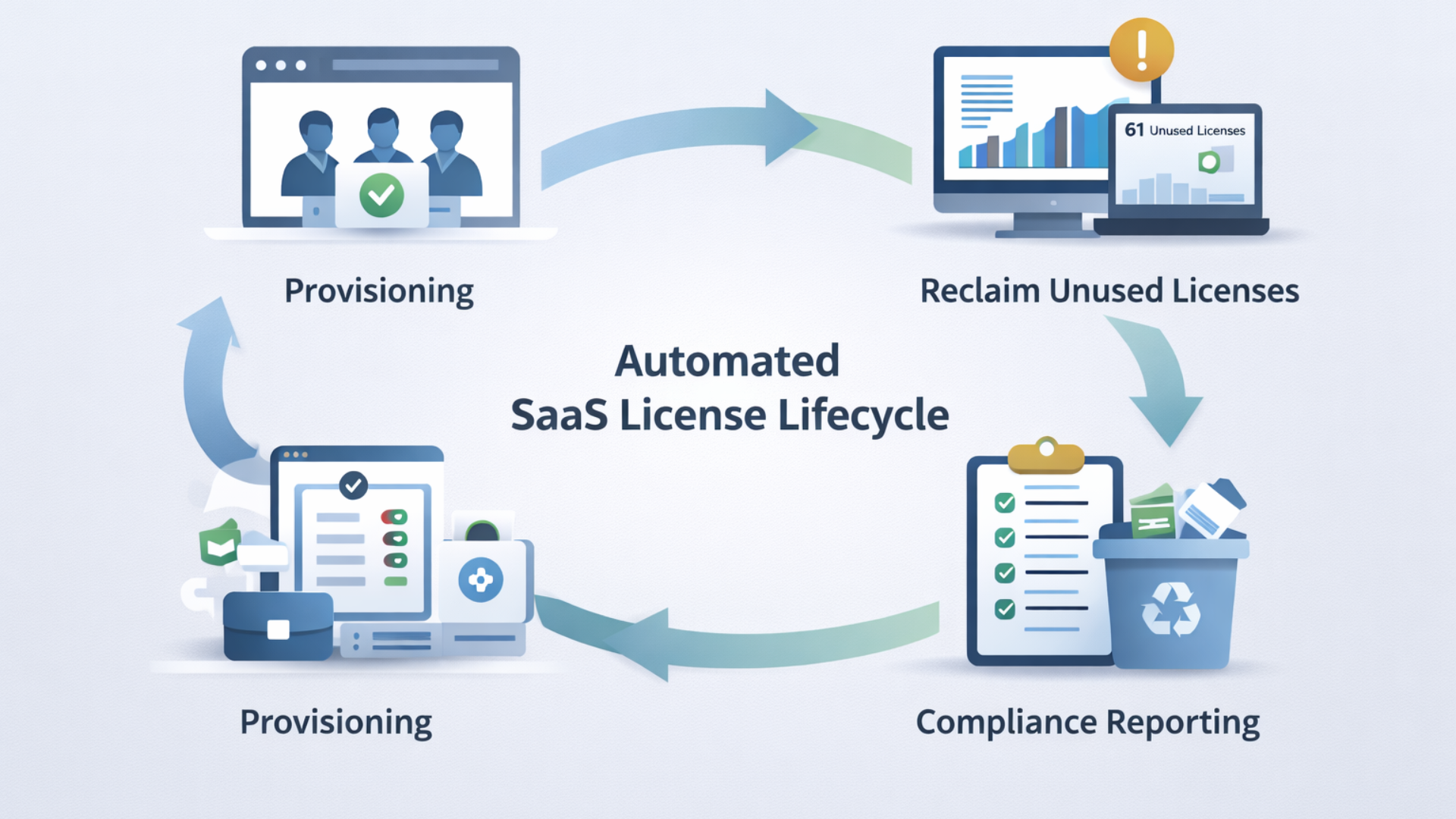
What is license management automation?
Simply put, license management automation is the use of software tools to track, provision, deprovision, and report on software licenses without the help of manual spreadsheets or email threads. It integrates information from your payment systems, identity provider, and the SaaS applications themselves to provide a clear picture of who has access, how much is spent, and how the licenses are being utilized.
Key capabilities you should expect from a good solution include:
- License usage tracking across dozens of apps
- Automated provisioning and deprovisioning based on HR or identity events
- Alerting for license expiration and renewal windows
- Compliance and audit reports with historical usage
- Cost allocation and chargeback reporting
Call it software asset management automation if you prefer. The important idea is removing repetitive manual work and turning license data into decisions.
Top benefits for mid to large sized businesses
Automation brings a lot of benefits. Here are the ones that matter most for IT managers, CIOs, CTOs, SaaS operations teams, and procurement leaders.
1. Reduce SaaS costs
Left unchecked, unused licenses are a silent budget leak. In my experience, organizations waste 10 to 30 percent of their SaaS spend on inactive or underutilized licenses. Automation helps you spot those inefficiencies quickly.
Simple examples work best. If 50 of 500 seats show no activity for 90 days, you can reclaim or reassign them. Multiply that by dozens of subscriptions, and you see real savings fast.
Automation supports active measures like reclaiming unused seats, applying lower tier licenses to partial users, and consolidating duplicate tools. Those actions turn into monthly savings and long term SaaS spend optimization.
2. Improve IT license compliance
Audits are stressful, and non compliance is costly. Automation provides concrete evidence of who used what and when. That reduces the risk of penalties and speeds up audit responses.
When license usage tracking automatically records access and consumption, you don’t need to scramble to collect screenshots or work through emails. You can generate a report and move on.
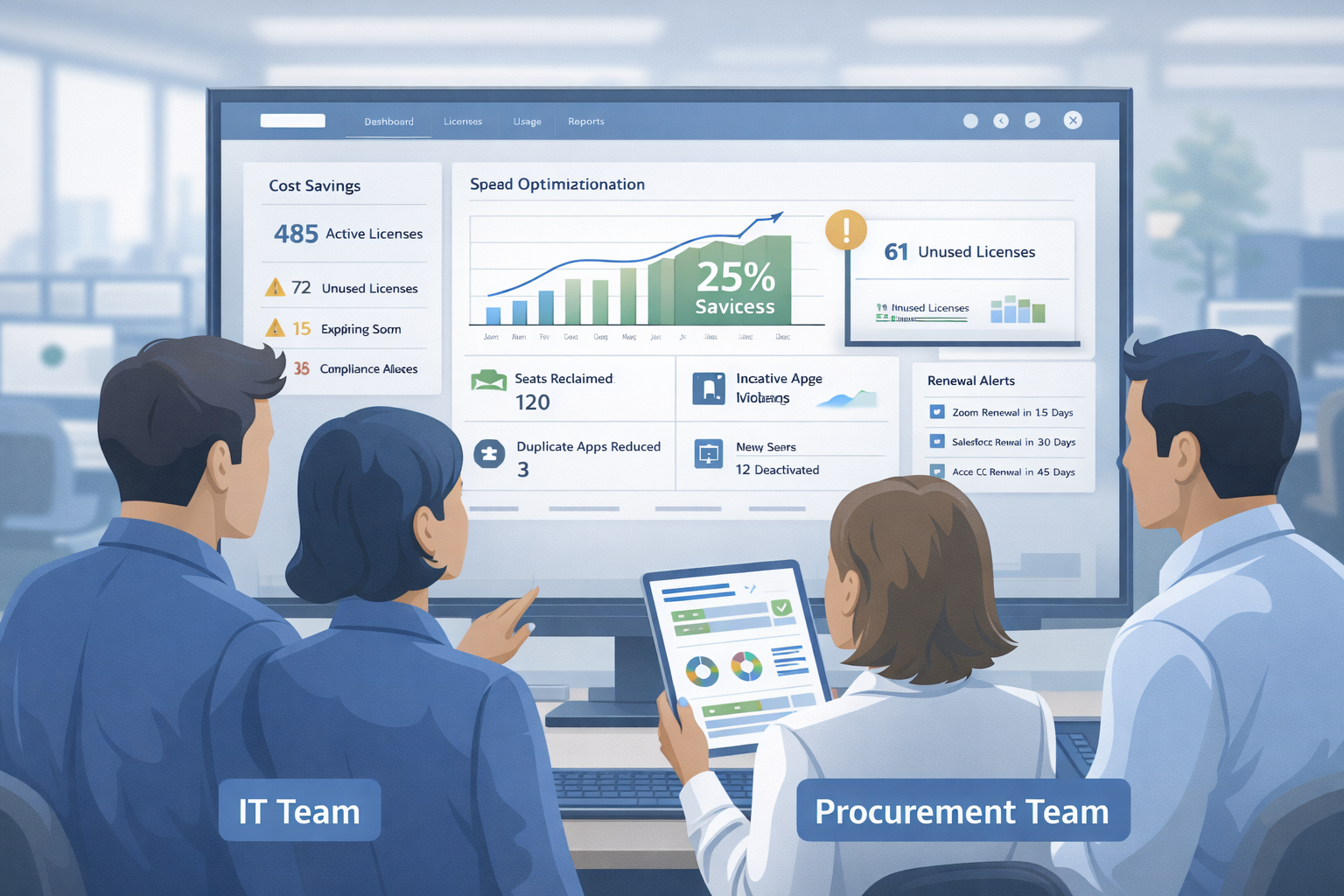
3. Gain full visibility and reporting
Visibility is the foundation for smart decisions. With automated dashboards, you can see trends across vendors, departments, and renewal cycles. You can answer questions like:
- Which apps have duplicate functionality?
- Who are the top 10 spenders in the company?
- How many licenses are inactive across all SaaS providers?
I find leaders make better procurement decisions when they can slice the data by team or project. That transparency makes stewardship of licenses part of everyday workflows, not a quarterly audit surprise.
4. Faster onboarding and offboarding
Manual onboarding is slow and error prone. If your systems are integrated, automation can create accounts when HR marks someone as hired and revoke access the day someone leaves. That reduces security risk and removes friction for IT.
Think about it: an automated workflow that ties directory events to license assignment prevents both over provisioning and delays that frustrate new hires.
5. Reduce shadow IT
People will always try new tools. Automation helps you spot that activity early. If a department picks up a new SaaS subscription, automated tracking shows spend and usage patterns, so procurement can decide whether to centralize or allow the tool.
This reduces uncontrolled growth and ensures that critical apps are supported and secure.
6. Better negotiation leverage with vendors
When you have historical usage data, you negotiate from a position of strength. You know what you actually use, where to reduce seats, and when to ask for a multi year discount.
Vendors expect customers to understand their own usage. Automation gives you the facts you need to optimize contracts.
How automation actually reduces SaaS waste and compliance risk
Words are one thing. How does automation lead to real outcomes? Here are practical mechanisms I’ve seen work well.
Automated license reclamation
Set policies to flag dormant accounts. For example, mark accounts with zero logins in 90 days and no active projects. Then automatically revoke licenses or move users to a cheaper plan after a staged notification. That single policy often returns a material portion of wasted licenses.
Role based provisioning
Use identity data to provision licenses based on role and need. If engineers need full access, give them full licenses. If someone only needs read access, assign a lower cost seat. This simple step reduces over provisioning and aligns cost with value.
Centralized billing visibility
Collect vendor invoices automatically and normalize them into a single view. This helps spot duplicate charges and subscriptions that should have been consolidated under a single corporate contract.
Audit ready records
Keep a change log for license assignments and access changes. If an auditor asks how many users had admin access on a certain date, you can show it. That cuts time spent preparing for audits and reduces the chance of non compliance penalties.
Practical examples and quick wins
Here are a few small actions you can take this month that typically produce quick returns.
- Create a simple policy for reclaiming licenses after 60 to 90 days of inactivity. Run a report and take action.
- Identify the top 10 SaaS subscriptions by spend and ask the teams why they need them.
- Link your identity provider to your license manager for automated provisioning or deprovisioning.
- Set up alerts for upcoming renewals at 90, 60, and 30 days. Start negotiation early.
These steps are low friction and high impact. I often recommend starting here because you can quickly show savings and earn buy in for larger automation projects.
How to choose a software license management tool
Not every tool is the same. When evaluating software license management tools, focus on capabilities that match your needs and environment. Here are practical criteria to guide your selection.
- Integrations: Does it connect to your identity provider, billing systems, and major SaaS vendors?
- License usage tracking: Can it measure active usage, not just seat counts?
- Provisioning automation: Does it support role based and rule based assignment?
- Reporting and audit logs: Are reports easy to generate and export?
- Policy enforcement: Can you automate reclaiming, reassignment, and approvals?
- Scalability: Does it handle thousands of users and multiple business units?
- Cost and ROI: What is the expected payback period from reclaiming licenses and negotiating better contracts?
Make sure the vendor understands enterprise concerns like SSO, SCIM, and contract management. Also, ask for real customer examples that match your industry and scale.
Common mistakes and pitfalls to avoid
I've worked with teams that rushed into tools without a plan. That usually creates disappointment. Here are frequent mistakes and how to avoid them.
1. Treating automation as a silver bullet
Automation reduces work, but it does not replace governance. You still need clear policies about roles, approvals, and renewal of ownership. Automation amplifies your policies. If the policy is weak, automation just scales the problem faster.
2. Ignoring identity integration
Not tying the license manager to your identity provider is a missed opportunity. Single sign on data is the best source of truth for active users. Without it, you will rely on imperfect heuristics and manual checks.
3. Starting too broad
Trying to automate every single subscription at once can stall the project. Focus on high spend apps and those with clear usage signals first. You can expand to smaller tools later.
4. Forgetting stakeholders
Licenses affect teams across the company. If procurement or department heads are not part of the process, you will hit resistance. Get stakeholders in early and show quick wins.
5. Relying solely on seat counts
Seat counts are easy, but they tell one side of the story. Track actual usage, frequency of logins, and feature access. Those signals help you decide whether to downgrade a seat, reclaim it, or consolidate tools.
Implementation roadmap
Deploying automation is not magical, but a clear roadmap helps. Here is a simple phased approach that I use with teams.
Phase 1 - Discover and baseline
- Inventory all subscriptions and owners
- Collect billing and usage data for the last 12 months
- Identify top 20 subscriptions by spend and by user count
Phase 2 - Pilot on a handful of apps
- Connect identity provider and 3 to 5 high spend apps
- Configure basic policies for reclaiming and provisioning
- Show the first month of savings and report back to stakeholders
Phase 3 - Expand and automate workflows
- Add more integrations and fine tune policies
- Introduce chargeback or showback reporting to business units
- Automate renewal alerts and vendor negotiation workflows
Phase 4 - Operationalize and measure
- Define KPIs and monthly reviews
- Ensure audit trails and compliance reporting are routine
- Continuously track SaaS spend optimization and reclaimed license metrics
This phased approach reduces risk and helps you prove value early. I've seen teams that follow it move from reactive spreadsheets to gatekeepers of procurement decisions in under three months.
Metrics that matter
To keep leadership engaged, track a few clear metrics. Don't overload dashboards with vanity numbers. Focus on measures that show impact.
- Percentage of SaaS spend reclaimed through automation
- Number of inactive licenses reclaimed per month
- Average time to provision or deprovision a license
- Audit response time with automated reports
- Number of duplicate tools consolidated each quarter
These metrics tell a story about cost control, operational efficiency, and compliance posture. They also help you justify the budget for further automation work.
Who should own license management?
This depends on your organization, but clarity matters. In my experience, the best models are shared ownership with clear responsibilities.
- IT or SaaS operations owns the tooling, integrations, and technical policies
- Procurement owns vendor contracts and negotiations
- Department heads own licenses assigned to their teams and approve exceptions
Make sure there is a central coordinator or program manager who runs the license governance loop. That person keeps the inventory accurate, runs monthly reports, and owns the relationship with vendors.
Integration and technical considerations
Integrations are where most projects either succeed or stall. Ask these technical questions early.
- Does the tool support SCIM for provisioning and deprovisioning?
- Can it integrate with your single sign on provider?
- Does it ingest invoices automatically, or is manual upload required?
- Can it pull usage telemetry from the SaaS vendor, or does it rely on proxy signals?
- Does it support multi tenant and role based access for global teams?
If you need help, look for vendors with prebuilt connectors for the market leaders in your stack. That reduces time to value and avoids custom engineering work.
Realistic ROI expectations
People ask how fast they will see savings. The answer: usually faster than you think. In my work with teams, the first 90 days often yield the biggest wins because you reclaim clearly unused seats and renegotiate or consolidate a few expensive contracts.
As a rule of thumb, expect first year savings in the range of 10 to 25 percent of the tracked SaaS spend, depending on how many unmanaged subscriptions you start with and how disciplined the teams are about adopting the automation. The higher end applies if you have lots of unmanaged spend and poor visibility.
Don’t promise unrealistic gains. Instead, show month over month reclaimed license counts and cost savings. Those numbers make an easy case for continuing the program.
Case scenario: a short example
Imagine a company with 1,200 employees and 100 active SaaS subscriptions. The IT team discovers through a pilot that 15 percent of seats across five major apps are inactive for 90 days.
They configure automated reclaiming for those apps, run a notification workflow to affected users, and reclaim 200 licenses in the first month. That recovers the budget that pays for the automation tool within three to six months. Over the first year, the company reduced redundant tools by consolidating two overlapping project management apps, saving additional subscription costs and support effort.
This is not hypothetical. I have worked on similar projects, and the common pattern is quick wins plus ongoing governance that keeps costs from drifting back up.
Read more :
Best practices checklist
Use this checklist as a quick guide to a successful program.
- Start with top spend apps and expand gradually
- Integrate with identity provider and enable SCIM where possible
- Create clear reclaiming and provisioning policies
- Keep stakeholders involved from procurement and business units
- Track a small set of meaningful KPIs
- Automate audit reporting and renewal alerts
- Review and refine policies quarterly
FAQs and quick answers
Below are short answers to common questions I hear from IT leaders.
Will automation slow down access for users?
No, not if policies are thoughtful. The typical approach is staged reclaiming: notify, warn, then reclaim. Provisioning can be immediate when tied to the HR or identity event.
How do we handle contractors and temporary workers?
Use time bound licenses or automated expiration dates. That prevents forgetfulness from creating lingering effects.
What about data privacy when integrating systems?
Choose tools that support role based access, encryption, and enterprise data protection. Limit who can see detailed usage to relevant teams.
Can automation help with multi year discounts?
Yes. Automated usage reports show real demand over time, which makes it easier to justify and negotiate longer term contracts at the right scale.
Final thoughts
License management automation is one of those operational changes that scales. Small policies and integrations from a small business seo company reduce risk and costs. I recommend starting small, showing wins, and then building from there.
If you manage a lot of SaaS spend, audit exposure, or distributed teams, this is a smart area to invest in. You do not need a perfect plan to begin. With the right tooling and a few rules, you can take back control of your software portfolio and free up budget for investments that actually move the business forward.
Helpful Links & Next Steps
- Agentia
- Agentia Blog
- Book a Meeting Today
- Hybrid AI Voice Assistant for Modern Business Communication
If you want a hand getting started or a quick review of your current license posture, Book a Meeting Today, and we can walk through a brief discovery session.