Agent Hub: One Platform to Manage and Scale Multiple AI Agents
Scaling a handful of AI agents is easy. Scaling dozens in production is not. This blog explains why ad-hoc scripts and scattered tools break down and how a centralized Agent Hub solves the real problems: orchestration, observability, cost control, versioning, and governance. It outlines proven multi-agent patterns, a practical hub architecture, operational best practices, and a clear migration path, showing how platforms like Agentia help teams run AI agents reliably at enterprise scale.
Running a single AI agent in production is one thing. Running dozens or hundreds is a different kind of problem. If you're a CTO or a product leader at an AI-first SaaS company, you probably know that the hard part is not the models. It is the plumbing, the visibility, and the operational discipline that let those agents reliably do work at scale.
I've noticed teams solve this by gluing together scripts, message queues, and spreadsheets. That works for a little while. Then observability breaks, costs spike, and someone asks a painful question at 3 AM. In my experience the most resilient approach is a centralized platform that treats agents as first class citizens. That is what an Agent Hub is for.
Why you need a centralized AI agent platform
Think about what managing one agent looks like. You deploy a flow, point it at a model, and set up logs. Now multiply that by ten or a hundred. Suddenly you have:
- Multiple endpoints, each with its own secrets and rate limits
- Different models, versions, and prompt variants in flight
- Distinct SLAs and cost profiles per agent
- Disparate monitoring and alerting systems
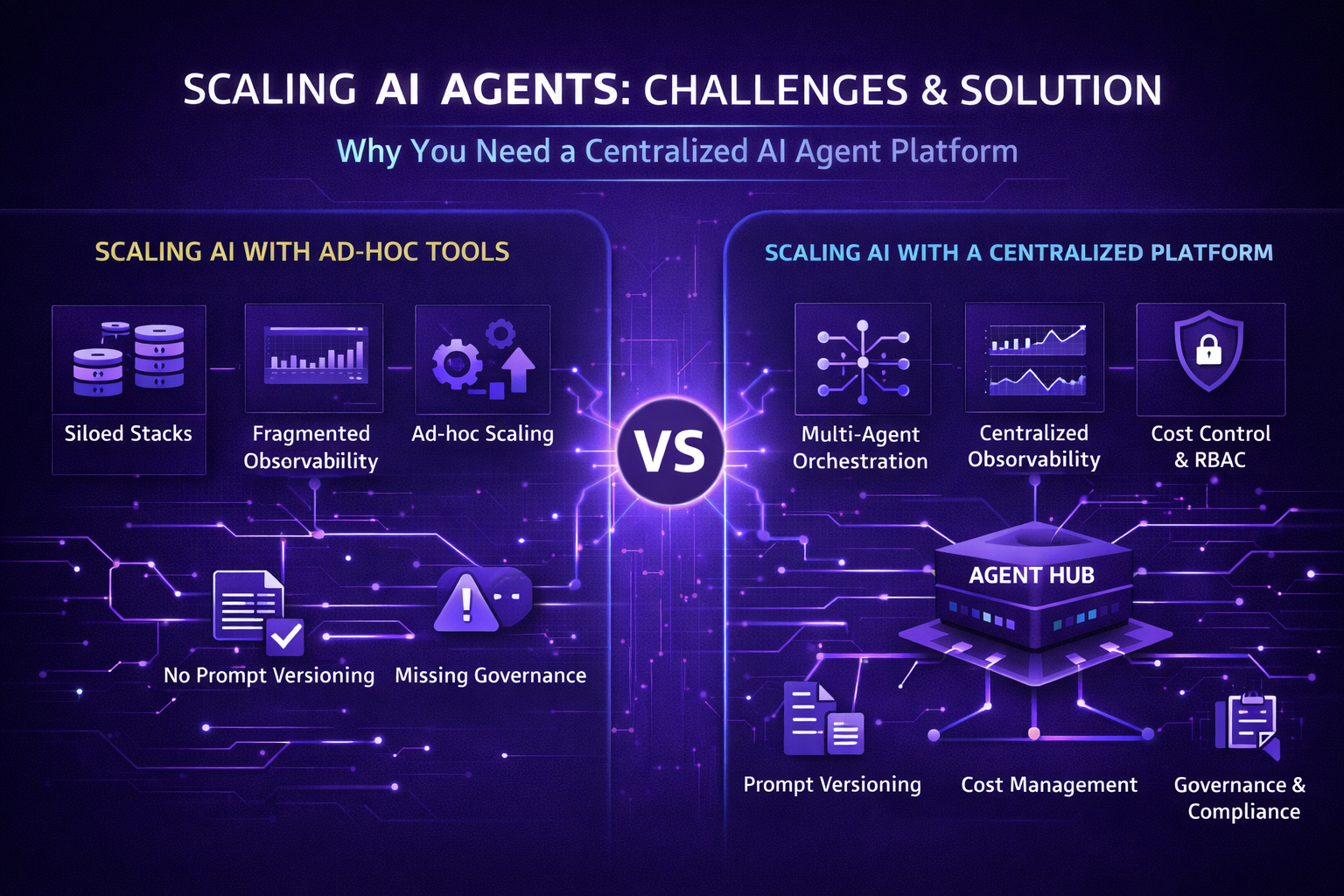
That complexity adds up fast. A centralized AI agent platform gives you a single control plane for agent orchestration, monitoring, governance, and deployment. You can manage multiple AI agents from one place and get consistent behavior across them. You also free your engineering teams to focus on product features, not firefighting.
Agentia was built for this exact problem. It acts as a hub that helps teams deploy, observe, and scale enterprise AI agents without rebuilding the same infra for each new use case.
Common pain points when scaling agents
Before we talk about architecture and patterns, it helps to call out the traps teams fall into. If any of these sound familiar, that is your cue to consider an agent orchestration platform.
- Siloed agent stacks. Teams build different infra for each agent. One team uses serverless functions, another uses containers. That makes cross-team debugging and cost allocation hard.
- Missing observability. Logs live in several places. No single dashboard shows latency, error rates, token usage, or throughput across agents.
- No version control for prompts and policies. Small prompt tweaks can cause big swings in behavior. Without versioning you cannot safely roll back.
- Ad-hoc scaling. Auto-scaling is often an afterthought. Loads spike and you see latency climbs or throttled requests.
- Cost surprises. Token counts, model switching, and retries blow up your bill. You need central cost visibility and budgeting per agent.
- Governance gaps. Secrets, approvals, and policy checks get skipped when teams move fast. That becomes risky in regulated environments.
These are not hypothetical. I have seen teams lose weeks trying to trace a production bug that spanned three agent workflows and two model versions. A centralized approach avoids those rabbit holes.
What an effective Agent Hub provides
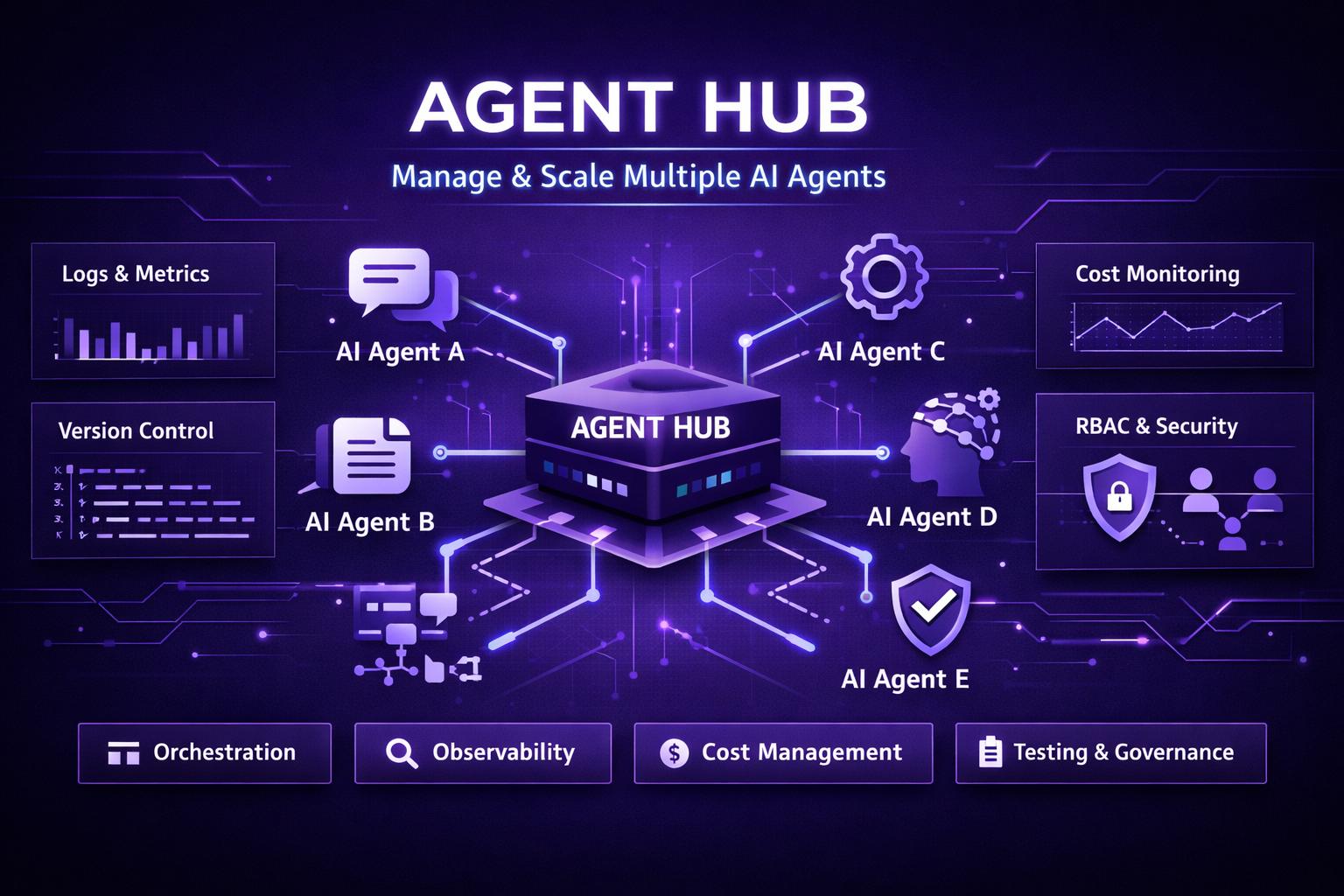
At a minimum, a practical centralized platform should provide the following capabilities. Each one addresses a direct operational pain point you will face as you scale.
- Agent registry and lifecycle management. A catalog of agents, their owners, their SLAs, and deployment history. You can see which agents are active, in staging, or retired.
- Multi-agent orchestration and routing. The ability to chain agents, fan out tasks, or route requests based on context. This is essential for complex workflows that span multiple specialized agents.
- Observability and telemetry. Central dashboards for latency, error rates, token usage, throughput, and cost per agent. Correlate traces across agents to debug end-to-end flows.
- Prompt and policy versioning. Treat prompts and safeguards like code. You want safe rollouts, canary deployments, and a quick rollback path.
- Secrets and access control. Securely manage API keys and credentials. Enforce role based access so that only approved teams can modify a production agent.
- Cost control and budgeting. Track spending per agent or per team. Set hard or soft limits to control runaway spending.
- Testing and staging flows. Simulate traffic, run regression tests, and validate agent outputs before promoting to production.
These features make up the backbone of an AI agent management platform. Together they reduce risk, standardize operations, and give you a place to measure and improve.
Core patterns for multi-agent orchestration
Orchestration is more than "call this model then that model." There are repeatable patterns that show up across use cases. Knowing them helps you design robust, maintainable systems.
1. Chaining
One agent processes data then invokes another agent for follow up. For example, an intake agent extracts entities from user input and passes structured data to a decision agent. Chaining keeps each agent focused on a single responsibility.
Tip: Keep messages small and structured. That reduces token usage and makes testing easier.
2. Fan-out and aggregation
Send the same request to multiple specialist agents and then aggregate their outputs. For instance, product descriptions, SEO optimizers, SEO packages and pricing and accessibility checkers might all review the same content. Use a central aggregator to merge results and resolve conflicts.
3. Supervisor and fallback
Use a supervising agent to validate outputs and decide whether a human should step in. When an agent's confidence is low or a policy check fails, route the task to a fallback path such as a human review queue.
4. Event-driven orchestration
Trigger agents in response to events. An error log, a CRM update, or a policy change can start a workflow. Event driven designs make the system reactive and decoupled.
5. State machine style flows
Some workflows need precise state transitions. Define explicit states and transitions rather than ad-hoc conditionals. This reduces surprises and makes audit trails simpler.
Building these patterns into your Agent Hub makes it simple to compose new agent workflows without rewriting the plumbing each time.
A simple Agent Hub architecture
You do not need to invent a new stack. Here is a straightforward architecture I've used that balances flexibility and operational control.
- API gateway. Central entry point for requests with authentication, rate limiting, and routing.
- Agent registry. A catalog that stores agent metadata, owner, version, and config.
- Orchestrator service. Responsible for composing workflows, routing to agents, and enforcing SLA and retry policies.
- Model adapters. Abstractions that talk to different model providers and handle token accounting and retries.
- Worker fleet. Containers or serverless functions that execute agent logic at scale.
- Event bus. Connects systems and supports fan-out and event driven flows.
- Observability layer. Central logs, traces, and metrics dashboards. Correlate requests across services and agents.
- Admin UI and CLI. For managing agents, deployments, prompts, and policy settings.
This setup lets you scale horizontally while keeping operational control. Each component solves a specific problem and lets you upgrade pieces independently.
Operational best practices
Here are the practices I recommend for teams moving from a handful of agents to many.
Version everything
Version prompts, policies, and agent code. If a prompt tweak changes behavior, versioning lets you compare and roll back quickly.
Example: Keep a commit history for prompts and attach the commit SHA to a deployed agent. If a customer calls out a regression, you can trace it back to a specific prompt version.
Use canary and staged rollouts
Deploy changes to a small percentage of traffic first. Observe metrics before you expand the rollout. This is standard for services and doubly important for agents whose outputs affect users directly.
Monitor the right signals
Beyond error rates and latency, track:
- Token usage per request and per agent
- Model switching events and their impact
- Confidence or quality signals from agents
- Human escalations and their causes
These signals help you balance quality and cost.
Automate cost controls
Set budgets and soft caps per agent or per team. When a cap is approaching, automatically throttle low priority agents or switch to cheaper models for non-critical tasks.
Enforce policy checks
Run policy checks as part of the pipeline. For regulated domains, do automatic redaction and run a compliance check before outputs reach users.
Design for observability
Instrument your agents with structured logs and distributed tracing. A trace that connects user input to model calls and final output is worth its weight in gold when troubleshooting.
Security and governance
Enterprise AI agents need more than technical resilience. They need governance. Here are the practical controls to put in place.
- Role based access control. Limit who can change prompts, deploy agents, or view sensitive logs.
- Secrets management. Use a central secrets store and avoid embedding keys in agent code or configs.
- Audit logs. Record who changed a prompt or deployed a model and when.
- Policy enforcement. Automate checks for disallowed content or PII leaks before outputs leave the system.
- Data residency and encryption. Ensure your platform supports the data locality and encryption requirements your customers expect.
If these controls are missing, you will be limited in the customers you can serve. Trust and compliance are competitive advantages.
Managing costs without killing quality
Cost management is a tightrope walk. Cheap models hurt experience. Expensive models can bankrupt a project. The right platform gives you the tools to strike a balance.
Here are some practical levers:
- Model routing rules. Route high value requests to premium models and low value ones to cheaper models.
- Adaptive prompting. Use compact prompts or retrieval augmented generation only when needed.
- Batching and caching. Cache repeated responses and batch similar requests for efficiency.
- Cost visibility. Report spending per agent, per team, and per feature.
In my experience, simple rules like "use the cheaper model for under 100 token outputs" save a lot while keeping user experience good. Small changes compound fast when you manage many agents.
Testing and validation
Testing agents is different than testing services. You need to validate not just correctness but quality and safety. Here are useful strategies.
- Unit test agent logic. Validate core decision rules and edge cases with unit tests.
- Regression test prompts. Capture a test corpus and check agent outputs against expected behaviors.
- Human in the loop QA. Periodically sample outputs for human review to detect drift and unwanted behavior.
- Simulate adversarial inputs. Test for prompt injection and for inputs that try to force policy violations.
Testing is never done. Agents drift as data and prompts change. Make testing part of the CI pipeline and the deployment gates.
Real examples of multi-agent setups
Simple concrete examples help. Here are a few I have seen in production.
Customer support automation
You have an intake agent that classifies tickets, a triage agent that suggests resolutions, and a billing agent that handles invoice queries. The orchestrator routes the ticket based on classification confidence. Low confidence goes to a human queue. This setup reduces average handle time and surfaces more complex issues to human agents.
Personalized onboarding
A product onboarding flow uses a profile agent to extract user goals, a content agent to craft step-by-step plans, and a scheduling agent that sets up follow ups. Each agent is small but together they deliver a personalized experience at scale.
Sales assistant
A prospect summary agent reads CRM data, a pitch agent drafts a tailored email, and a compliance agent checks regulatory language. Using a central hub, you can track which pitch variants lead to conversions and iterate quickly.
Common mistakes to avoid
When teams start building an agent hub, these mistakes crop up again and again.
- Reinventing the whole stack. You do not need to build everything from scratch. Use a platform that covers the control plane and integrates with your infra.
- Keeping logs scattered. Centralize telemetry early. If you wait until you have 50 agents you will regret it.
- Skipping prompt versioning. Prompt changes without version history cause regressions that are hard to trace.
- Over-optimization too soon. Do not prematurely optimize cost before you understand traffic patterns. Measure first, then apply policies.
- Lack of ownership. Each agent needs a product owner and an SLA. Without that you will have neglected agents that fail silently.
How Agentia helps
Agentia is built to be the hub that solves the operational headaches above. It gives you a centralized AI agent platform where you can register agents, orchestrate workflows, control costs, and monitor performance across your fleet.
Here is what teams get when they adopt Agentia:
- Single control plane for agent lifecycle management
- Built in multi-agent orchestration patterns like chaining, fan-out, and supervisor flows
- Centralized observability for token usage, latency, errors, and cost attribution
- Prompt and policy versioning with safe rollout tools
- RBAC, secrets management, and audit trails for compliance
- Easy integrations with your event bus, data stores, and monitoring stack
We designed Agentia for product teams that want to move fast without multiplying operational debt. If you are managing enterprise AI agents, adopting a platform like Agentia will save engineering time and reduce risk.
How to adopt an Agent Hub
Moving to a centralized agent platform does not have to be disruptive. Here is a pragmatic migration plan I recommend.
- Inventory your agents. Catalog every agent you have, who owns it, and whether it runs in production or in experiments.
- Pick a pilot. Choose a high impact, low risk agent to migrate first. Customer support or onboarding flows work well.
- Instrument early. Add structured logging and token accounting before you migrate. This makes comparison easier after migration.
- Migrate in phases. Move the agent to the hub, keep the existing infra as a fallback, and run canary traffic.
- Standardize templates. Create agent templates for common patterns so new agents are consistent from day one.
- Enforce governance. Add RBAC, budgets, and policy checks as part of the migration checklist.
Small, measured steps reduce risk and deliver quick wins that build confidence across teams.
Questions to ask when evaluating platforms
When you're evaluating an AI agent management platform, here are the concrete questions that matter to CTOs and product leaders.
- Can I register and manage multiple agents from one control plane?
- Does the platform support multi-agent orchestration patterns out of the box?
- How does it handle prompt and policy versioning and rollbacks?
- What observability metrics does it capture natively and how do I integrate them with my dashboards?
- Does it handle secrets and RBAC in a way that satisfies our security policies?
- Can I control costs at the agent level and route traffic to different models programmatically?
- How easy is it to integrate with our event bus and existing data stores?
- What SLAs and support does the vendor offer for production enterprise agents?
Answers to these questions separate platforms that are useful from those that are just shiny. In my experience, the best solutions integrate with your existing systems and give you a clear path to production without heavy lift.
Frequently Asked Questions
Q1: What is an Agent Hub, and why do I need one?
A: An Agent Hub is a centralized platform for managing, orchestrating, and monitoring multiple AI agents. It solves operational challenges like fragmented observability, prompt/version control, cost management, and governance, which ad-hoc scripts and scattered tools cannot handle efficiently at scale.
Q2: What are the key features to look for in a centralized AI agent platform?
A: Essential features include agent registry and lifecycle management, multi-agent orchestration patterns, observability dashboards, prompt and policy versioning, secrets management with RBAC, cost control tools, and testing/staging capabilities for safe deployments.
Q3: How can an Agent Hub help reduce operational risk and costs when scaling AI agents?
A: By centralizing control, observability, and governance, an Agent Hub prevents errors, redundant infrastructure, and unexpected costs. It allows staged rollouts, budget monitoring per agent, and automated policy enforcement, ensuring reliable, efficient scaling of multiple AI agents in production.
Read more :-
Final thoughts
Managing multiple AI agents is operational work. It requires intentional design, good instrumentation, and repeatable patterns. Without a centralized approach, you will spend effort fighting the infrastructure instead of building product value.
If you are scaling AI in production, consider adopting an agent orchestration platform that gives you a single place to manage agents, observe performance, enforce governance, and control cost. Agentia is one example of a platform built for that purpose. It helps you run enterprise AI agents efficiently so your teams can focus on delivering product improvements and customer value.
Questions? Curious how this would fit your stack? I love walking through concrete architectures and migration plans. Book a time and we can sketch how an Agent Hub would work for your setup.