WhatsApp Automation Tools: The Secret to Effortless SMB Growth
In case you operate a small or medium enterprise, then you must be aware that quick answers and individual attention are the things that customers are wanting. Still, you may not have the personnel or the time to provide that all day long, every day. Thus, automation of WhatsApp business has changed the role from a luxury to a necessity for most teams. With a proper setup, I have witnessed teams cut down their response time from hours to minutes. It is somewhat like having a co-worker who is always awake and works non-stop.
In this article, I will explain the significance of WhatsApp automation, present some actual use cases for small and medium-sized businesses, and provide a guide on the features you should consider in tools, avoiding frequent mistakes, and quick steps to start. No frills, only useful and practical tips ready for your immediate use. I will also highlight the traps I have encountered during this process and provide you with the templates for quick copying.
Why WhatsApp Automation Is a Game Changer for SMBs
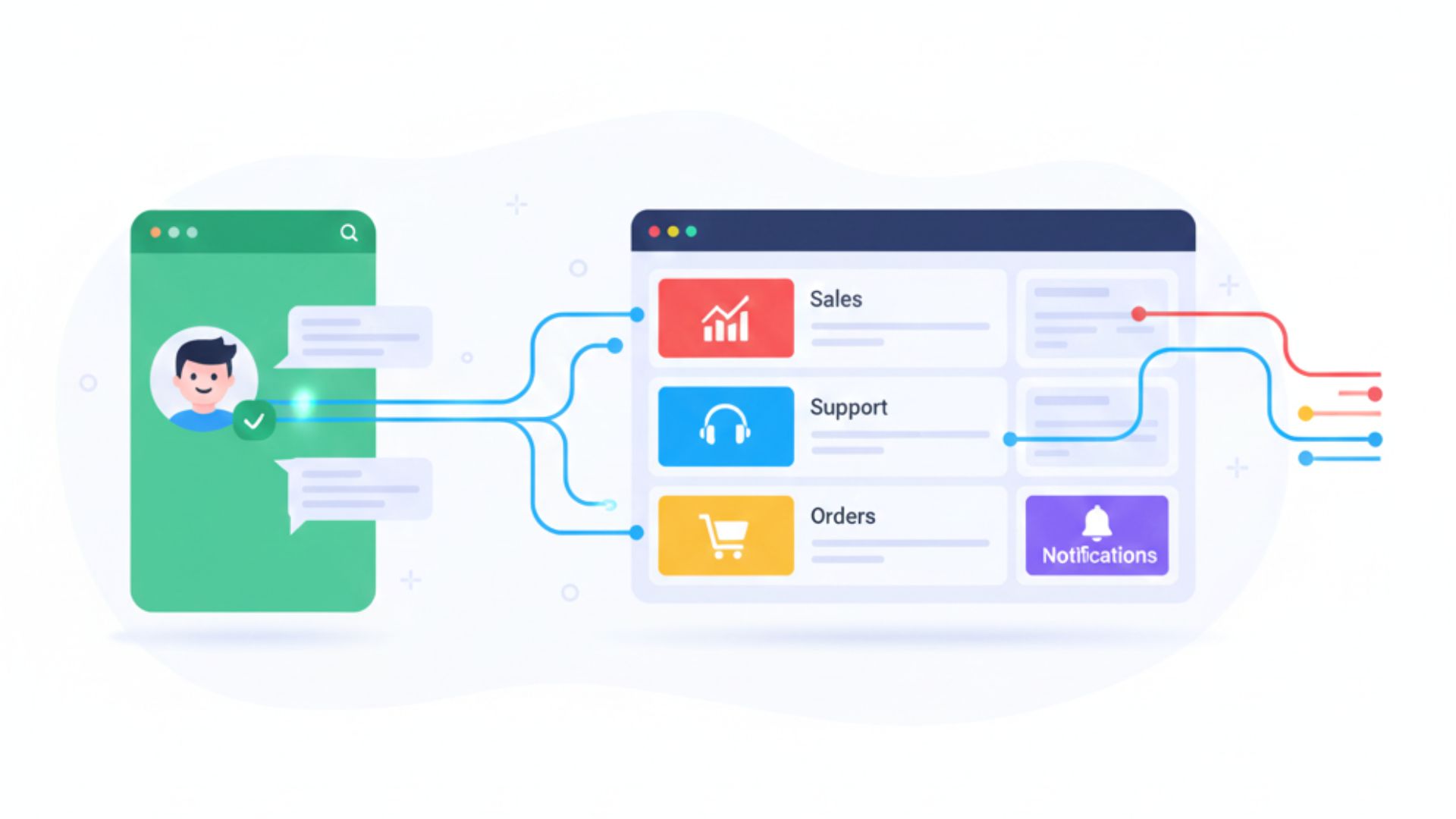
WhatsApp has gained significant popularity all over the world. For a lot of people, it is the primary means of communication. They message first, subsequently send an email, and if necessary, they might make a phone call. This scenario makes WhatsApp marketing tools as well as WhatsApp business automation great growth levers.
- Higher open and response rates. Customers open WhatsApp messages far more than email. That means your promo messages, updates, and alerts get seen.
- Better customer experience. You can automate confirmations, shipping updates, appointment reminders, and quick FAQs so customers get instant answers.
- More efficient teams. Automation handles routine work so sales and support can focus on complex issues and high-value conversations.
- Improved conversion. A quick follow-up message after a site visit or cart abandonment often nudges people to buy.
In short, WhatsApp CRM integration together with the automation of customer engagement transforms individual conversations into processes that can be scaled up while still keeping the warmth and intimacy of personal communication. That balance is what drives SMB growth.
Common Use Cases for WhatsApp Automation
Not sure how to use automation beyond sending a welcome message? Here are practical examples that actually move the needle.
1. Lead capture and follow-up
Through the usage of WhatsApp marketing tools, it becomes feasible to get potential clients by means of a landing page, social ad, or QR code. A robot can, in a matter of seconds, send a reply, put the lead through a few quick questions to see if it is a hot one, and, if it is, the lead can be given to a sales representative.
Example:
- Auto reply: "Thanks for contacting us. Quick question: are you looking for product A or product B?"
- If answer matches sales criteria, notify salesperson with lead details and conversation history.
2. Transactional messages and shipping updates
Customers like predictable service. Automate order confirmations, payment receipts, shipping notifications and delivery confirmations so people always know what's happening with their purchase.
Simple message template:
- "Order #12345 confirmed. Estimated delivery: April 10. Track here: [link]"
3. Automated customer support
Automation will handle the tasks like frequently asked questions, password resets, return policies, and simple troubleshooting. For those issues that the bot cannot handle, switch the dialogue to a human agent along with the complete case history so that customers do not have to retell their story.
4. Appointment booking and reminders
Make the whole appointment scheduling process automated along with the notifications and reminders to be sent out so that the number of no-shows decreases. It would be great if you could also add the option to reschedule or cancel through chat.
5. Re-engagement campaigns
The target clientele, who have not made any purchases for a while, are to be provided with personalized offers. Due to the high engagement rate of WhatsApp messages, these campaigns are generally more successful than email reactivation drives.
What to Look for in WhatsApp Automation Tools
All tools aren't the same. I recommend evaluating solutions across these dimensions before picking one.
- Official WhatsApp API support. Use platforms that integrate with WhatsApp Business API for reliability and compliance.
- CRM integration. Make sure the tool syncs contact data, conversation history, and tags with your CRM. WhatsApp CRM integration is where automation becomes strategic instead of just tactical.
- Message templates and flows. You should be able to create multi-step flows that include buttons, quick replies, and conditional paths.
- Human handoff. Automation must know when to hand off a conversation to a human agent with context preserved.
- Analytics and reporting. Track open rates, response times, conversion from messages, and cost per conversation.
- Security and compliance. Look for encryption, data residency options, and features that support GDPR or local privacy laws.
- Scalability and pricing. Choose a solution that can grow with you and has transparent pricing.
I've found many SMBs pick tools based on price alone and later regret it when they outgrow basic features. A small extra investment upfront saves pain later.
How to Implement WhatsApp Business Automation - A Practical 6-Step Plan
The implementation of automation must not go through complications. Follow the following rules to a pilot implementation within a matter of weeks.
- Identify high-impact use cases. Start with things that save time or drive revenue. Order updates, booking confirmations, and lead qualification are good first picks.
- Map the user journey. Draw the conversation flow. What triggers a message? What decisions can customers make? Decide when to route to humans.
- Select the appropriate instrument. Rate suppliers using the list of criteria mentioned earlier. In case you are using a CRM at present, give priority to the platforms that offer integration with WhatsApp CRM as a built-in feature.
- Create message templates. Keep language short and conversational. Use quick replies and buttons for common actions. Test tone with your team.
- Run a controlled pilot. Test with a segment of customers. Monitor metrics and collect feedback. Iterate quickly.
- Scale and optimize. After the pilot, scale to more users, add new flows like re-engagement campaigns, and refine messages based on data.
A useful piece of advice that I have picked up is: begin with little tasks and take measurements. Although it is very alluring to implement full automation at a go, gradual victories reveal what is effective and make the clients satisfied all the time.
Simple Message Templates You Can Use Today
Templates save time and ensure consistency. Below are bite-size examples you can plug into your flows. Keep them short, friendly, and action-oriented.
- Welcome: "Hi, I’m Alex from [Company]. Thanks for reaching out. Can I help you with products, orders, or support?"
- Order confirmation: "Thanks for your order #1234. We’ll update you when it ships. Track here: [link]"
- Shipping update: "Good news. Your package is on the way and will arrive on [date]. Reply 'TRACK' for the latest status."
- Calendar alert: "Reminder: [Name]'s appointment is on Thursday at 2:00 PM. Message 'RESCHEDULE' to change the time."
- Lead qualification: "Quick question: is your budget under $5k or over $5k? Reply 1 for under, 2 for over."
These are intentionally simple. Complex sentences slow customers down. Short messages get action.
WhatsApp CRM Integration - Why It Matters
WhatsApp on its own is great for one conversation at a time. But to make automation truly effective you need integration with your CRM. Here's why.
- Full context. Support agents can see order history, recent interactions, and account details right inside the CRM. That avoids repeated questions.
- Personalized outreach. Use CRM fields to insert customer names, purchase dates, and product details into messages so they feel personal.
- Automation triggers. Sync events like new leads, purchases, or subscription renewals to automate relevant messages.
- Measurement. Track conversations and conversions in your CRM to tie WhatsApp efforts directly to revenue.
Based on what I have seen, the teams that neglect CRM integration eventually face the problem of split data and discontented employees. If you really want to grow, then integration should be at the top of the list.
Key Metrics to Track
What you measure tells you what you can improve. For WhatsApp automation, I track these core KPIs.
- Response time. From message sent to first reply. Automation should lower this significantly.
- Resolution rate. Percentage of conversations resolved without human intervention.
- Conversion rate. How many conversations lead to a sale, booking, or desired outcome.
- Customer satisfaction. Short post-chat NPS or CSAT surveys work well in WhatsApp.
- Cost per conversation. Helps compare automation plus human support vs legacy channels.
Be observant of trends and not only of individual occurrences. A minor decline in contentment immediately after a new process is implemented generally implies that the communication needs to be adjusted rather than the automation to be considered as not successful.
Common Mistakes and How to Avoid Them
I see the same errors again and again. Avoid these to keep your WhatsApp automation effective and customer-friendly.
- Automating everything. If every message is automated, customers feel boxed in. Leave room for a human to step in fast.
- Poor handoff. Don’t leave a conversation mid-flow without context for agents. Always pass full history and customer details.
- Overly promotional messages. Salesy blasts on WhatsApp annoy customers. Use personalization and limit frequency.
- Ignoring edge cases. Think through wrong inputs and fallback paths in flows. Ask "What if the user types something unexpected?" and plan for it.
- Not monitoring analytics. If you don’t check metrics, you won’t know what needs fixing.
One easy fix: always include a "Talk to an agent" option. Users choose it more than you might expect.
Security, Compliance, and Best Practices
Privacy matters, and WhatsApp conversations hold sensitive info. Follow these guidelines to keep data safe and stay compliant.
- Use platforms built on the official WhatsApp Business API to avoid sandbox or unofficial solutions.
- Encrypt sensitive info whenever possible and avoid sending full payment details over chat.
- Respect opt-in rules. Only message customers who agreed to be contacted over WhatsApp.
- Keep message frequency reasonable and let customers unsubscribe easily.
- Document data retention policies and align with local laws like GDPR when relevant.
Compliance isn't just legal protection. It builds trust. Customers notice when you treat their data responsibly.
Pricing Considerations for SMBs
Pricing models vary. Some providers charge per conversation, some per active user, and others a flat platform fee plus per-message costs. Here's what to keep in mind.
- Predictability. If you send variable message volumes, look for transparent per-conversation or subscription pricing.
- Hidden costs. Account setup, template approvals, template changes, and integration work can add up. Ask for a full cost breakdown.
- Scale economics. Per-message fees often shrink as volumes grow. Make sure contracts let you scale without sudden price jumps.
My advice: run a 3-month budget simulation based on expected volume and potential growth. It will prevent bill shock.
Real-World Example: A Local Retailer
Here's a short case that illustrates the power of WhatsApp automation. I worked with a local retailer that sold craft supplies. They had a small team and lots of repeat customers.
We automated three flows: order confirmations, restock alerts for wishlisted items, and an abandoned cart reminder. They synced everything with their CRM so the sales reps saw customer purchase history during chats.
Results in two months:
- Response time dropped from 6 hours to under 20 minutes for common queries.
- Abandoned cart recovery increased purchases by 8 percent.
- Customer satisfaction rose because customers got quick stock updates and simple order tracking.
This wasn’t rocket science. Simple flows and good CRM integration delivered real growth.
Choosing Between In-House vs. Vendor Solutions
Should you build your own automation or use a vendor? Here’s a quick way to decide.
- To capitalize on vendor-integrated fast support, set up with integrated vendors because no matter what struggles small- and mid-size businesses go through vendors should work out in their favor.
- If your company has specific workflows, developer manpower, and time to support the system, then go for building in-house. However, in such case, it is still probable that a provider will be used for WhatsApp Business API.
Personally, I recommend starting with a vendor to validate the business case. If you hit scale and need custom features, consider shifting parts in-house later.
Tips for Writing Better WhatsApp Messages
Writing for WhatsApp is different from email. Messages should be brief, human, and actionable. Here are a few rules I always follow.
- Lead with value. Tell customers why the message matters in the first line.
- Ask one question at a time. Too many choices confuse people.
- Use buttons and quick replies for common actions. They reduce typing and errors.
- Be explicit about next steps. If you need a confirmation, say exactly how to respond.
- Keep tone consistent with your brand but friendly and conversational.
Here’s a quick before and after:
Before: "Hello. We have a special offer that may interest you. Click here to learn more."
After: "Hey Maria. We restocked your favorite yarn in two colors. Want me to reserve a skein for you? Reply 'YES' to hold one."
See the difference? The second message is personal, actionable, and easy to respond to.
How to Measure ROI for WhatsApp Automation
ROI isn’t just revenue. Include time savings and improved customer lifetime value when you calculate returns. Here's a simple framework.
- Estimate time saved per handled query by automation.
- Multiply by hourly cost of staff to find cost savings.
- Add incremental revenue from conversion lifts like recovered carts and confirmed bookings.
- Subtract platform and implementation costs over the same period.
- Don't forget soft wins like improved CSAT and reduced churn. They matter for long-term value.
For many SMBs, the math gets positive within a few months. I've seen payback in as little as six weeks for teams with high message volume.
Common Questions I Hear From SMBs
Do customers mind being contacted on WhatsApp?
Only if you abuse the channel. Most customers welcome updates and helpful messages. Always get opt-in, keep messages relevant, and allow easy opt-out.
What if we don’t have a CRM?
Nevertheless, you may employ the automated software tools, though, the personalization and analytics will not be your part. The first step can be taken by implementing a straightforward CRM solution or a spreadsheet which is synchronized with your automation tool. The result will be good.
How much technical skill is required?
Basic flows can be built without coding. For deeper CRM integrations or advanced routing, you'll need developer support. Many vendors offer setup services to bridge that gap.
Is WhatsApp right for B2B?
Absolutely. B2B buyers use WhatsApp for quick questions and scheduling. The channel speeds up procurement conversations and customer support for many industries.
Final Checklist Before You Launch
- Chosen use cases and mapped user journeys
- Selected a vendor or decided on in-house build
- Configured CRM integration and data syncing
- Built and tested message flows with fallback paths
- Set up metrics tracking and a feedback loop
- Trained staff on handoff and escalation
Tick these boxes and you’ll avoid most surprises.
Parting Thoughts
WhatsApp automation isn’t a silver bullet, but it’s one of the highest-impact SMB growth tools you can adopt. It reduces friction, improves customer experience, and helps your team do more with less.
If you're starting from scratch, focus on a few high-value flows like order updates and lead qualification. Measure results, iterate, and extend to re-engagement and support automation as you learn. Keep things conversational and always give customers an easy path to a human.
If you want to see how a modern platform can help, Agentia offers a practical way to get started. They support WhatsApp CRM integration and ready-made automation templates that are built for SMB workflows. It’s a good next step if you want to move fast without reinventing the wheel.
Helpful Links & Next Steps
If you're curious how WhatsApp business automation could fit into your processes, I recommend starting with a quick demo. It’s the fastest way to see real flows and costs in your context.
Frequently Asked Questions (FAQs)
1. What is WhatsApp automation for small and medium businesses?
WhatsApp automation uses tools built on the WhatsApp Business API to automatically handle messages such as inquiries, order updates, appointment reminders, and lead follow-ups, helping SMBs respond faster without adding staff.
2. Is WhatsApp automation expensive for SMBs?
No. Most WhatsApp automation tools offer flexible pricing based on conversations or usage. For many SMBs, the cost is quickly offset by time savings, faster responses, and higher conversion rates.
3. Do customers like receiving automated WhatsApp messages?
Yes—when done right. Customers appreciate timely, relevant, and helpful messages like order updates or quick answers. The key is opt-in, personalization, and not over-messaging.
4. Can WhatsApp automation replace human support teams?
No. Automation should handle repetitive and simple queries, while complex or sensitive conversations should be smoothly handed over to human agents with full context.
5. What are the best use cases for WhatsApp automation?
High-impact use cases include lead qualification, order and shipping updates, appointment booking and reminders, FAQs, abandoned cart recovery, and customer re-engagement campaigns.
6. Do I need a CRM to use WhatsApp automation?
A CRM is not mandatory, but it is highly recommended. WhatsApp CRM integration enables personalization, better tracking, automation triggers, and clearer ROI measurement.
7. Is WhatsApp automation suitable for B2B businesses?
Absolutely. B2B teams use WhatsApp automation for lead follow-ups, scheduling demos, sharing updates, and speeding up sales and support conversations.
8. How long does it take to implement WhatsApp automation?
Most SMBs can launch a basic setup within 1–2 weeks, starting with a few high-impact flows like lead capture or order confirmations, then expanding gradually.
9. Is WhatsApp automation secure and compliant?
Yes, if you use tools built on the official WhatsApp Business API. These platforms support encryption, opt-in management, and compliance with regulations like GDPR.
10. What metrics should SMBs track for WhatsApp automation?
Key metrics include response time, resolution rate, conversion rate, customer satisfaction (CSAT/NPS), and cost per conversation.
11. Can I personalize automated WhatsApp messages?
Yes. With CRM integration, you can personalize messages using customer names, order details, preferences, and past interactions, making automation feel human.
12. What mistakes should SMBs avoid with WhatsApp automation?
Common mistakes include over-automation, overly promotional messaging, poor human handoff, ignoring analytics, and failing to plan for unexpected user inputs.
13. Is WhatsApp automation better than email for customer communication?
For time-sensitive and conversational interactions, yes. WhatsApp has significantly higher open and response rates compared to email, making it ideal for engagement and support.
14. Can I start WhatsApp automation without technical skills?
Yes. Many platforms offer no-code builders and ready-made templates. Advanced integrations may require developer support, but basic automation is beginner-friendly.
15. How do I know if WhatsApp automation is working for my business?
If response times drop, customer satisfaction improves, and you see higher conversions or time savings within a few months, your automation is delivering ROI.